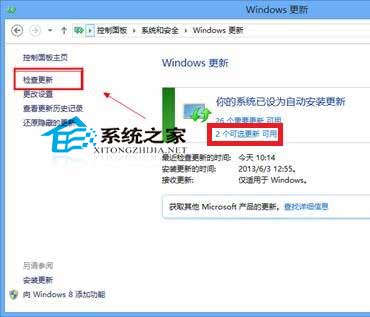
可選更新重要性較低但系統持續提示?隱藏法:
日後想裝時,在 Windows Update 左側選「還原隱藏的更新」即可下載安裝。習慣用第三方工具(如電腦管家)管理更新者可忽略此設定。
Windows 8 Metro 介面將常用網站「釘」到開始畫面:IE10 磁磚化操作體驗
Windows 8 開啟命令提示字元三大法:搜尋、執行、Win+X 選單 (含管理員模式)
Win8/8.1 恢復開機按 F8 進入進階啟動選單:bcdedit /set {default} bootmenupolicy legacy
Windows 8 開始畫面「影片」應用程式播放技巧:開啟、控制、縮圖預覽全螢幕
ASUS 華碩 Win8 筆記本藍屏六大常見原因與對策
微軟官方盤點 Windows 8 五大核心優勢與 13 項關鍵特性
Win8.1 升級 Win10 完整實測流程:從「取得 Windows 10」推送到桌面就緒
Win8 設定 IE 瀏覽器開啟 .mht 檔案:網際網路選項→程式→設定關聯勾選 .mht