Windows XP Windows 7 Windows 2003 Windows Vista Windows 綜合教學 Linux 系統教學
Windows 10 Windows 8 Windows 2008 Windows NT Windows Server 電腦軟體教學

Windows 8.1 关闭搜索功能的 Bing 联机建议与 Web 结果

編輯:Win8 系統應用技巧

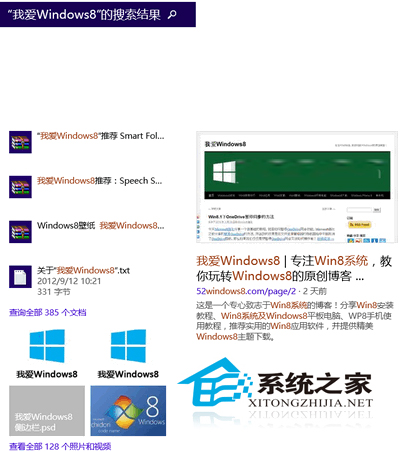
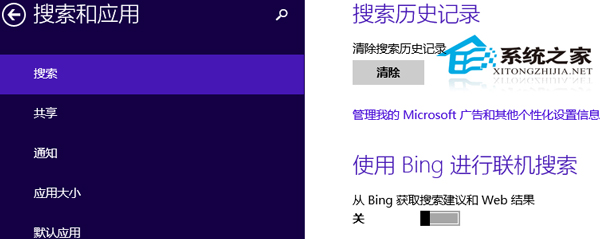
Windows 8.1 搜索魅力栏默认联网获取 Bing 建议与网页结果,若仅需本地文件/设置/应用搜索,可在“电脑设置 → 搜索和应用 → 搜索”关闭“从 Bing 获取搜索建议和 Web 结果”,提升搜索响应速度并保护隐私。
设置路径

  1. 魅力栏 → “设置” → “更改电脑设置”。
  2. “搜索和应用” → “搜索” → 右侧将“从 Bing 获取搜索建议和 Web 结果”拨至“关”。

关闭后,搜索框仅返回本地索引结果(文件、设置、应用、存储空间),不再发送查询字符串至 Bing 服务器。Windows 10/11 对应设置在“设置 → 隐私和安全性 → 搜索权限 → 云内容搜索”管理。部分用户反映宽带连接后自动弹出 Bing 主页,属浏览器主页劫持或运营商 DNS 劫持,需排查浏览器设置/路由器 DNS/Hosts 文件。

Copyright © Windows教程網 All Rights Reserved