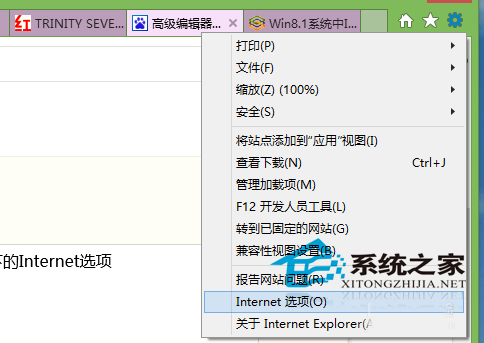
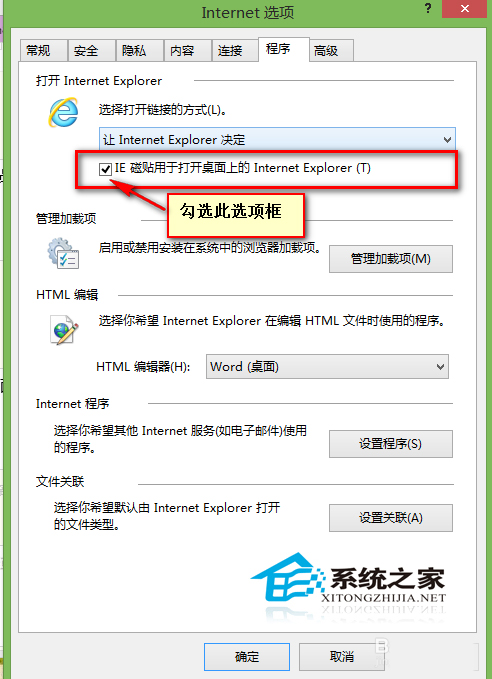
Windows 8 開始畫面的 IE 磚若點擊無反應,通常是因為「網際網路選項」中未勾選「讓 IE 磚在桌面版 Internet Explorer 中開啟網站」。
此設定決定 Modern 版 IE 與桌面版 IE 的啟動關聯,調整後可統一瀏覽體驗。
Windows 8/8.1 找回網頁與應用儲存密碼:認證管理器完整操作指南
Win8 設定 IE 在新索引標籤開啟網頁:Internet 選項→索引標籤設定→彈出視窗與連結行為
Win8 IE10 收藏夾雲端同步設定:Microsoft 帳戶一鍵啟用
微軟釋出補丁修正 Win8.1 滑鼠延遲問題:影響《使命召喚》、《CS:GO》等多款熱門遊戲
鍵盤玩轉 Windows 8 新介面:Win 鍵完全指南
Windows 8 硬碟碎片整理與最佳化:內建工具完整操作圖解 (含 SSD 自動修剪)
Win8 滑鼠右鍵點擊工作列程式圖示出錯/變色?卸載 KB3072318 更新修復
Win8 版掃雷正式上架:介面全面翻新、支援 Xbox Live 成就