Windows 8/8.1 更新 Adobe Flash Player 後,若出現無法載入、ActiveX 篩選錯誤,通常是 Flash.ocx 元件註冊失敗。以系統管理員身分執行註冊指令即可修復。
以系統管理員身分開啟命令提示字元(Win + X →「命令提示字元 (系統管理員)」),依序輸入:
32 位元元件註冊:
cd C:\Windows\System32\Macromed\Flash
regsvr32 Flash.ocx
64 位元元件註冊(64 位元系統必做):
cd C:\Windows\SysWOW64\Macromed\Flash
regsvr32 Flash.ocx
成功時會彈出「DllRegisterServer 在 Flash.ocx 成功」訊息。
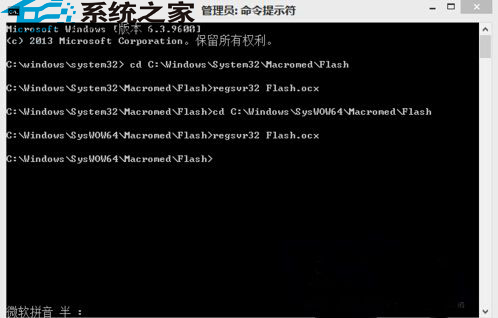
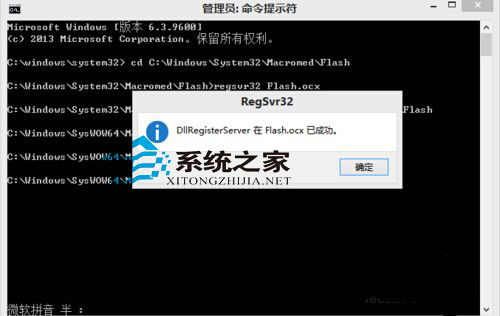
regsvr32 為註冊/解除註冊 COM 元件工具,重新註冊 Flash.ocx 可修復登錄檔損毀