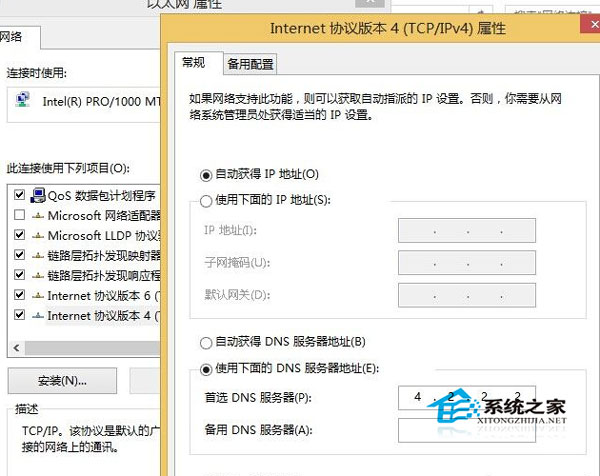
Windows 8.1 更新 Preview 版時提示「無法完成安裝」,常因無法連線 Microsoft 更新伺服器,修改 DNS 為公開 DNS 即可解決。
ncpa.cpl
4.2.2.2
8.8.8.8
8.8.4.4
此法適用於所有 Windows Update 連線失敗、錯誤代碼 80072EFD/8024402C 等 DNS 相關問題。
Win8 筆電開啟 Wi-Fi 熱點手機無法連線?三大排查步驟解決
Win8 新安裝無法上網?兩大修復方案:修改網卡速度雙工、重裝官方驅動
Win8 螢幕鍵盤沒有詞彙聯想功能?切換手寫模式開啟聯想
Win8.1 關機設定缺少「快速啟動」選項?啟用休眠功能恢復
Windows 8.1 移除內建輸入法指示器圖示:控制台語言進階設定三步驟
Windows 8 四大快速關機法:Charms 列、Alt+F4、工作管理員、shutdown 指令
Windows 8 通知功能開啟與關閉影響說明
Win8 查看現代應用程式佔用空間:電腦設定→可用儲存空間→檢視應用程式大小