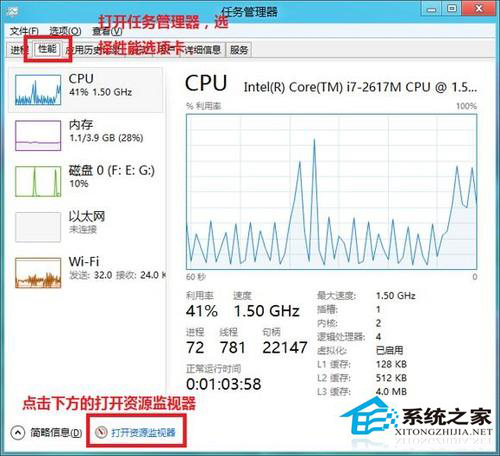
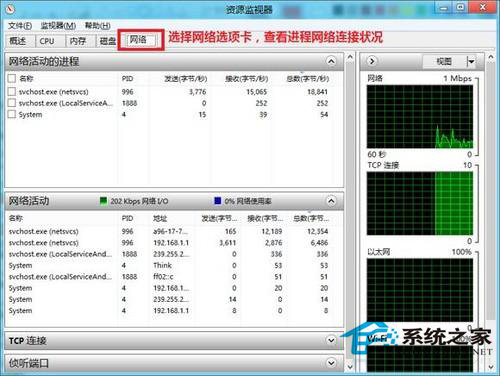
Windows 8 工作管理員整合了資源監視器,可即時查看每個程序的網路傳輸速度、連線狀態、TCP 連線數,比舊版更直觀。
此功能可快速找出佔用頻寬的程式(如雲端同步、更新下載、惡意軟體外連),無需安裝第三方網路監控工具。
Win8 語音控制功能完整指南:啟用、指令、滑鼠網格拖曳
Windows 8 啟用檔案選取核取方塊的完整教學
無法更新到 Windows 8.1(0xC1900101-0x40017)完整排查與修復方案
管理 Win8 檔案歷程記錄:原理、啟用、外部儲存、資料庫擴充備份
Win8.1 檔案總管無法開啟、提示找不到腳本?註冊表修復法
Win 8 開啟 Windows Defender 即時防護:內建防毒全攻略
Win8 進入睡眠模式後不斷網:網路卡電源管理取消允許關閉裝置
Win8.1 應用檢視排序設定:依類別排序時優先顯示桌面應用