Windows 8.1 桌面右鍵選單可自訂加入常用程式(記事本、QQ、截圖工具、滑動關機等),無需第三方軟體,透過登錄編輯即可實現私人化快捷選單。
regedit 開啟登錄編輯器。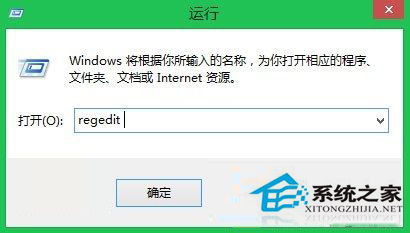
HKEY_CLASSES_ROOT\Directory\Background\shellshell 下新建「機碼」(項),名稱為程式顯示名稱(如 Notepad、QQ、SnippingTool、SlideToShutDown)。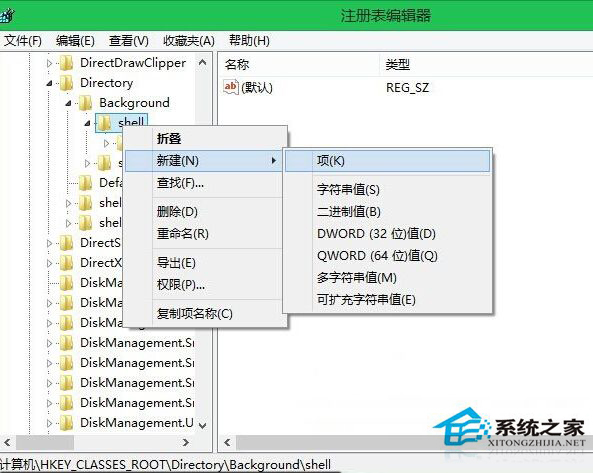
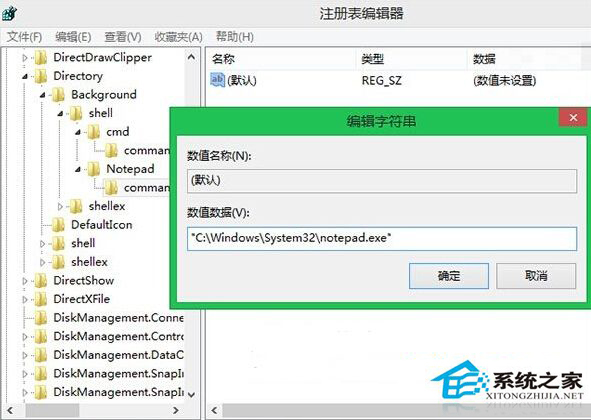
command,雙擊預設值,輸入程式完整路徑(可右鍵程式捷徑 → 「複製為路徑」取得):"C:\Windows\System32\notepad.exe""C:\Windows\System32\SnippingTool.exe""C:\Windows\System32\SlideToShutDown.exe"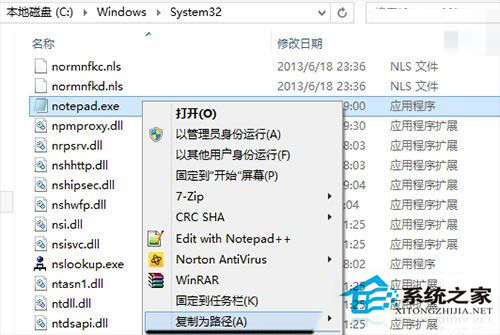
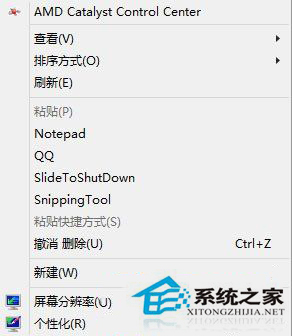
刪除對應建立的機碼(如 HKEY_CLASSES_ROOT\Directory\Background\shell\Notepad)即可移除選單項目。
此技巧同樣適用於 Windows 7/10/11,打造專屬右鍵快捷選單。