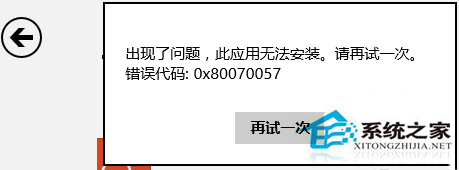
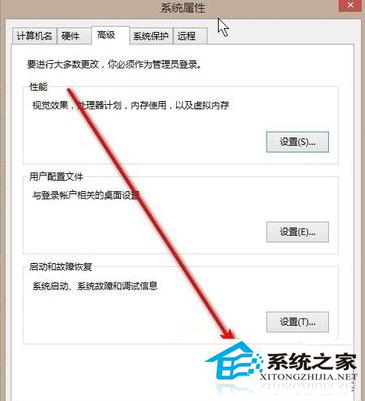
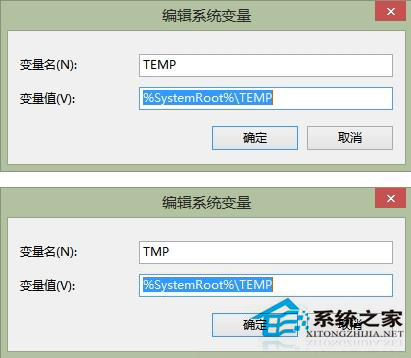
Windows 8 應用商店安裝應用報錯 0x80070057,主因是使用者/系統環境變數 TEMP、TMP 路徑被修改導致安裝暫存目錄異常。還原預設路徑即可解決。
0x80070057
TEMP
TMP
%USERPROFILE%\AppData\Local\Temp
%SystemRoot%\TEMP
建議:修改前建議先卸載已失敗的應用殘留檔案,避免舊暫存檔干擾。
Win8 燒錄光碟完整教學(內建功能)
Win8 內建 DxDiag 查看硬體規格:CPU、記憶體、顯卡三大核心資訊一鍵取得
Win8 開啟 DOS 視窗四大法:Win+R輸入CMD、開始選單執行、DOS啟動碟、矮人DOS工具箱
Win8/8.1 開啟 RAR 檔案完整指南:必裝解壓縮軟體與關聯設定
Windows 8 磁碟使用率 100% 完整解決方案:12 招從輕量到重裝
Windows 8 系統維護小技巧:清理 Windows.old、調整磁碟分割、修改開機選單
Win8.1 雙顯卡筆電運行 GTA4 紅色 R 圖示閃退:強制獨顯模式+驅動重裝+VC++ 運行庫完整修復指南
拒絕遠端修改 Win8 登錄鍵值:透過群組原則封鎖網路存取路徑