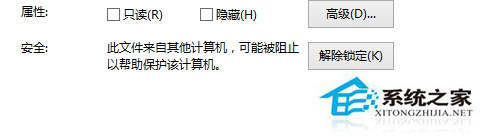
IE 下載檔案被標記「區域識別碼」導致屬性顯示「解除封鎖」按鈕,群組原則關閉附件管理器鎖定功能即可免除手動解鎖。
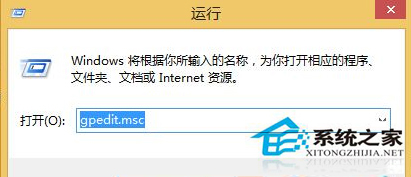
gpedit.msc
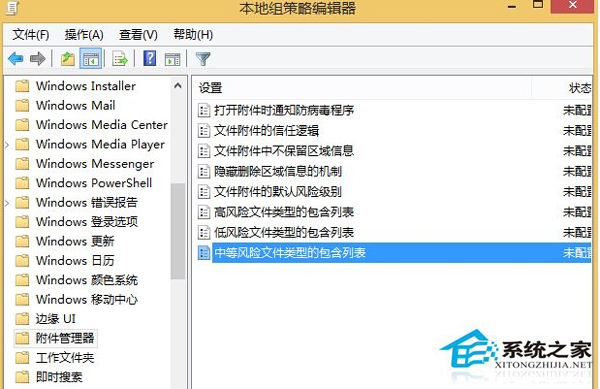
修改生效需重啟或執行 gpupdate /force。注意:關閉區域識別會降低安全性 (執行來源不明檔案無警告),建議僅對信任來源下載檔案操作,或單獨針對低風險副檔名設定。
gpupdate /force
Win8 開機提示 FunKoala64.dll 找不到?屬風行播放器殘留,刪除檔案或重裝卸載清理
Windows 8.1 觸控鍵盤完整使用指南:版面切換、拇指鍵盤、文字建議與手勢技巧
Win8/8.1 系統優化 13 招:關閉視覺特效、排程優化、索引選項、Temp 資料夾移動、快速關機捷徑、Superfetch、混合開機、GUI 引導、Windows.old 清理、IPv6、Defender 等
Win8 修改系統地理位置:控制台 → 時鐘、語言和區域 → 更改位置
Windows 8 解決資料夾「拒絕存取」問題:取得擁有權與權限完整教學
Win8 右鍵「新增」選單僅顯示「資料夾」?系統資料夾權限限制非 Bug,管理員身分即可建立其他類型
Windows 8 進階技巧:玩轉任務管理器(含自訂欄位、核心監控)
Windows 8 使用者名稱、Microsoft 帳戶、管理員帳戶、電腦名稱四大身份辨析