Windows XP Windows 7 Windows 2003 Windows Vista Windows 綜合教學 Linux 系統教學
Windows 10 Windows 8 Windows 2008 Windows NT Windows Server 電腦軟體教學

Win8 應用商店安裝報錯 0x80244019?重置 SoftwareDistribution 與 wsreset 指令修復

編輯:Win8 系統應用技巧

Windows 8 應用商店下載安裝應用時出現 0x80244019 (WU_E_PT_HTTP_STATUS_NOT_FOUND),通常是商店快取與 Windows Update 快取不一致導致。

修復步驟 (依成功率排序)

  1. 重置 Windows Update 快取 (核心解法):
  • 以管理員身分開啟 CMD,執行:
    net stop wuauserv
    ren C:\Windows\SoftwareDistribution SoftwareDistribution.old
    net start wuauserv
  • 系統會自動重建乾淨的 `SoftwareDistribution` 資料夾。
  1. 執行商店重置指令:
  • 按 Win + R 輸入 wsreset.exe 執行,等待命令視窗自動關閉並自動開啟商店。
  1. 若仍失效,嘗試 PowerShell 重新註冊商店 App:
  • 以管理員身分開啟 PowerShell,執行:
    Get-AppXPackage -AllUsers -Name Microsoft.WindowsStore | Foreach {Add-AppxPackage -DisableDevelopmentMode -Register "$($_.InstallLocation)\AppXManifest.xml"}
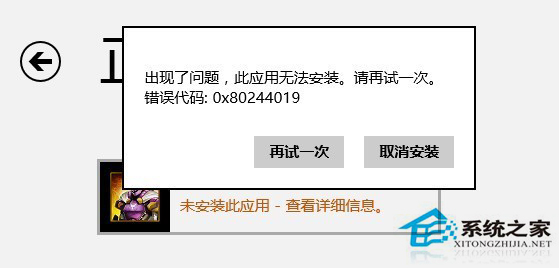
重複下載安裝無法解決此錯誤,必須清除快取並重置商店元件。上述步驟 1+2 組合成功率最高。

Copyright © Windows教程網 All Rights Reserved