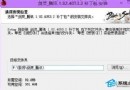
error:cannot load file (code:5555h) 表示 Ghost 安裝盤無法重建 MBR(主開機記錄),常發生於含隱藏分區的硬碟,與硬碟模式/分區類型無關。
error:cannot load file (code:5555h)
避免建議:使用通用 PE 工具箱內建 DiskGenius 分區時,預設會重建引導,且桌面提供引導修復工具,可一次解決分區與引導問題,避免 5555h 錯誤。
Win8.1 禁止開機自動啟動瀏覽器 登錄修改法
Windows 8.1 低分辨率屏幕通过注册表启用分屏(LSSnapping)功能
Win8 安裝更新補丁後黑屏無法進入安全模式?用安裝媒體修復啟動完整流程
Win8 螢幕鍵盤三種開啟方式:輸入法軟鍵盤、觸控鍵盤、系統螢幕鍵盤
Win8.1 無法安裝 KB2904440 提示「不適用您的電腦」:語言/位元版本不符或更新不適用
Win8 無法連網解決辦法:網路疑難排解與基礎檢查
Win8 內建「影音播放」應用程式怎麼用?支援 WMV 格式基本播放
Win8.1 任務列圖示中間出現大空隙?三步排除法快速修復