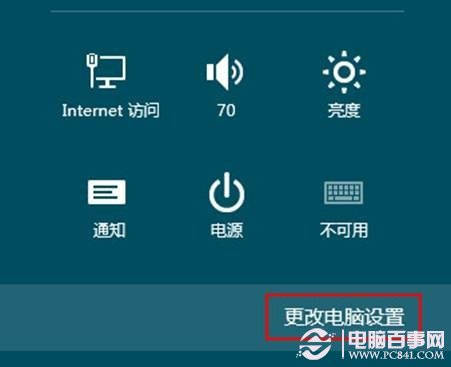
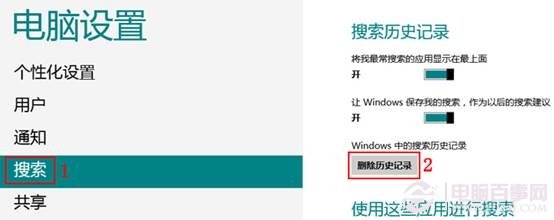
Windows 8 搜尋功能強大但會記錄搜尋歷程,不僅可能洩露隱私,累積過多也會拖慢搜尋速度。定期清除歷程可提升效能。
完成後搜尋回應速度將明顯改善,隱私也獲得保護。
Windows 8 行動中心完整教學:Win+X 呼叫、亮度/音量/電源/投影快速設定
微軟拼音輸入法打特殊符號完全攻略:希臘字母、圖形、顏文字一鍵搞定
裝完 Win8 必做三件事:個人化定制、Microsoft 帳戶同步、Win8 應用管理
Windows 8 沒聲音?三步驟排查:硬體檢查、疑難排解、更新驅動程式
Windows 8 如何關閉應用程式:開始畫面與傳統桌面雙軌操作指南
Windows 8 相片應用分享與列印:Charms 共用郵件/SkyDrive/社交應用、裝置 Charms 列印照片
Windows 8 Metro 程式分畫面顯示技巧:註冊表強制啟用
Metro 版 IE 消失?設定第三方瀏覽器為預設導致的已知限制