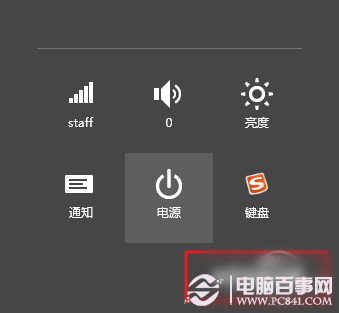
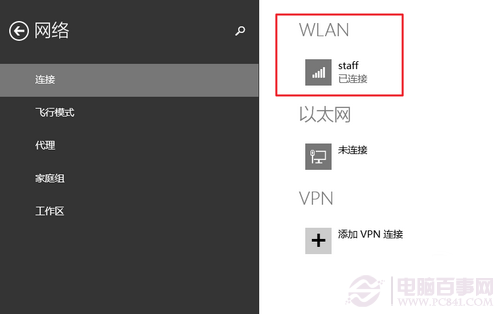
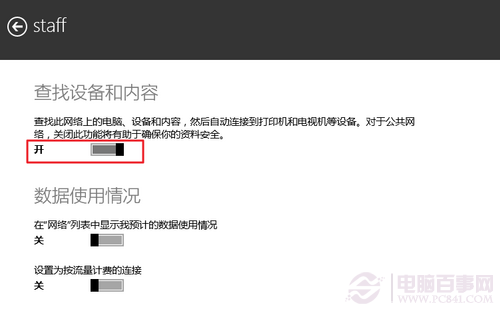
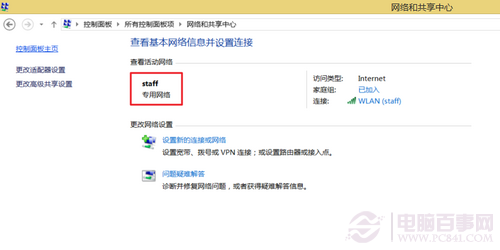
Win 8.1 網路類型預設為「公用網路」,無法進行裝置探索與檔案共享。改為「私人網路」步驟:
私人網路環境下可正常使用 HomeGroup、檔案共享、裝置探索等功能。
杜絕意外關機:移除 Windows 登入畫面電源按鈕的完整教學
Windows 8 體驗連載 (五) 隱藏小工具大揭秘 (三):Metro 瀏覽器 - IE10 前身、WP7 風格介面、方塊網址列
Win8.1 修改 Office 2013 產品金鑰 (序號) 的標準圖文教學
Win 8 開機自動開啟數字小鍵盤:修改登錄 InitialKeyboardIndicators = 2
Windows 8 語音辨識:以聲音控制電腦操作與輸入文字
Win 8 Charm 列(超級按鈕)完整操作指南:搜尋、分享、開始、裝置、設定五大模組
Windows 8 安裝速度大幅提升:微軟官方數據對比 Windows 7
Windows 8 隱藏細節大揭秘:11 個你可能錯過的實用新功能(上)