Windows XP Windows 7 Windows 2003 Windows Vista Windows 綜合教學 Linux 系統教學
Windows 10 Windows 8 Windows 2008 Windows NT Windows Server 電腦軟體教學

微軟官方認證:哪些虛擬機能完美運行 Windows 8?

編輯:Win8 系統基礎知識

虛擬機大亂鬥:誰能穩跑 Win8?

Win8 開發者預覽版釋出,各虛擬機軟體紛紛宣稱支援。實測勝負如何?
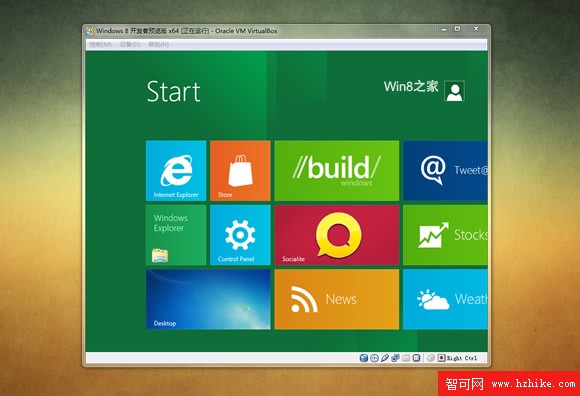
一、Oracle VirtualBox:先驅者,但門檻較高

  • 最早支援 Win8 (洩漏版時微軟自家虛擬機均失敗)。
  • 優點:體積小、免費、內建簡中。
  • 缺點:需 CPU 支援硬體虛擬化,無 VT-x/AMD-V 的舊機型報錯連連。

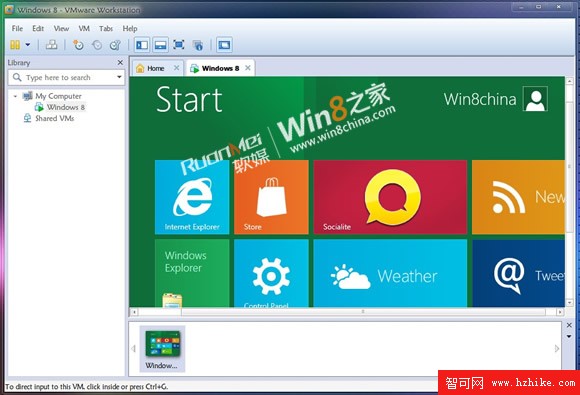
二、VMware Workstation 8:晚到的救星

  • 功能強大、企業級桌面虛擬化標桿。
  • 缺點:體積大 (442 MB)、英文版、需註冊碼。
  • 關鍵優勢:無需 CPU 硬體虛擬化支援即可安裝 Win8,拯救大量舊機用戶。

三、微軟官方白名單:聽微軟的準沒錯

Building Windows 8 官方部落格給出權威清單:

✅ 官方支援 Win8 的虛擬化產品

  • Hyper-V in Windows 8 Developer Preview
  • Hyper-V in Windows Server 2008 R2
  • VMware Workstation 8.0 for Windows
  • VirtualBox 4.1.2 for Windows (實際 4.1.2 前多版本已支援)

❌ 官方不支援清單

  • Microsoft Virtual PC (所有版本)
  • Microsoft Virtual Server (所有版本)
  • Windows 7 XP Mode
  • VMware Workstation 7.x 或更舊版本

對不支援清單中的產品,小編拒絕評價——微軟說了算。

Copyright © Windows教程網 All Rights Reserved