厭倦每次開機需手動從 Metro 開始畫面點擊「桌面」?兩步驟即可實現開機直進桌面:
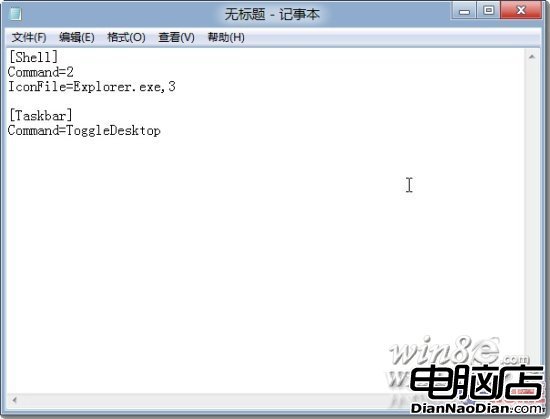
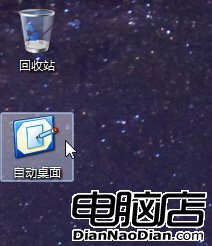
自動桌面.scf
[Shell]
Command=2
IconFile=Explorer.exe,3

[Taskbar]
Command=ToggleDesktop
shell:startup
測試:開啟數個視窗後雙擊捷徑,所有視窗最小化即表示生效。此法相容所有 Windows 8 預覽版與正式版。
Windows 8 TrustedInstaller.exe 佔用高 CPU:Windows 模組安裝程式正在更新,建議關閉自動更新
Windows 8 理財應用推薦:益盟操盤手(股市)、隨手記(記帳雲同步)、自選股(全球行情)
微軟 TechEd 大會展示四核心 Windows 8 平板原型機
Win8/8.1/10/11顯示副檔名:檔案總管功能區一鍵設定
Windows 8 實戰體驗全記錄:安裝、破解、介面操作與優缺點深度分析
Windows 8 快速關機技巧:建立桌面關機磚塊,一鍵關機不再繞路
Win8 調整回收站容量教學:避免大檔案直接永久刪除
Win 8 電源選項加入「休眠」:筆電省電利器啟用教學