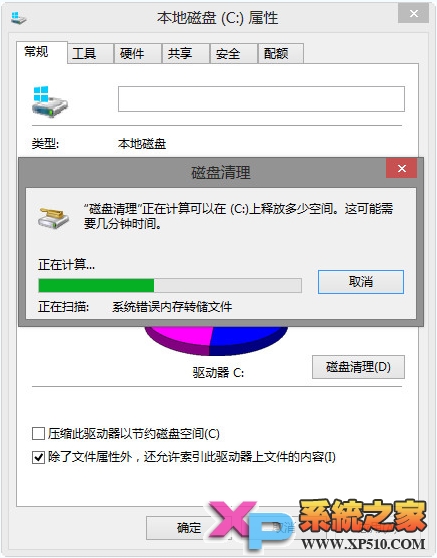
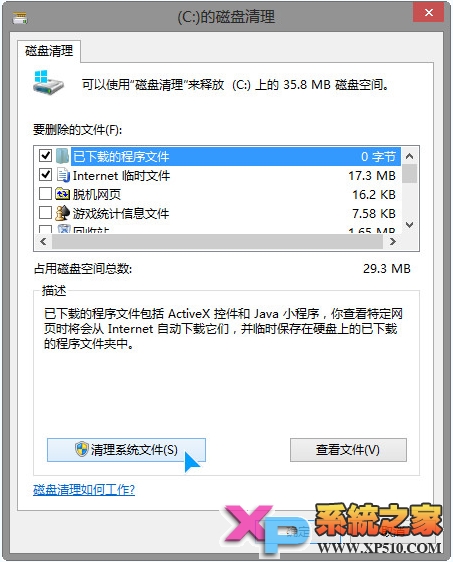
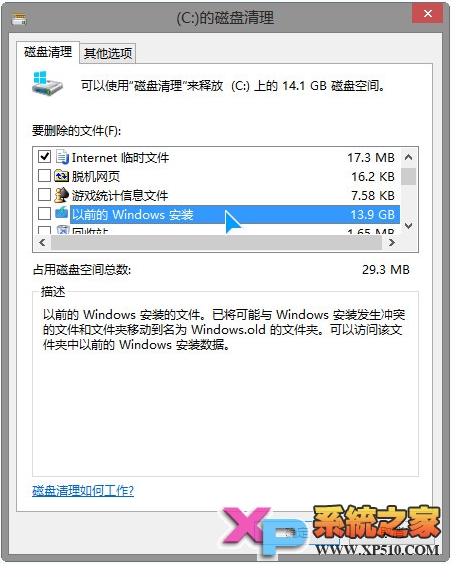
升級安裝 Windows 8 後遺留的 `Windows.old` 資料夾佔用數 GB 空間。內建「磁碟清理」可安全、完整移除,無需手動刪除 (易遺漏/權限錯誤)。
管理員命令提示字元:
takeown /f C:\Windows.old /r /d y
icacls C:\Windows.old /grant administrators:F /t /c
rd /s /q C:\Windows.old
預裝 Win8 筆電無損分區教學:使用分區助手調整 C 槽釋放空間
Windows 8 檔案共享完整設定教學:資料夾權限、網路探索、密碼保護
深度解析:GPT 磁碟下 OEM 復原分區屬性設定與 Diskpart 進階指令
Windows 8 購物應用推薦:如意淘全網比價、搜購一站式搜尋,觸控體驗極佳
Win8 顯示或隱藏副檔名?檔案總管 Ribbon 介面一鍵切換
Win8.1 寬頻撥號錯誤 651?啟用三項遠端存取服務並設為自動
Windows 8 二合一平板變身工作休閒全能機:HP ENVY x2 實測分屏靠貼、Office/SkyDrive 雲端協作、酷我音樂/美圖秀秀/淘寶/口袋購物娛樂應用