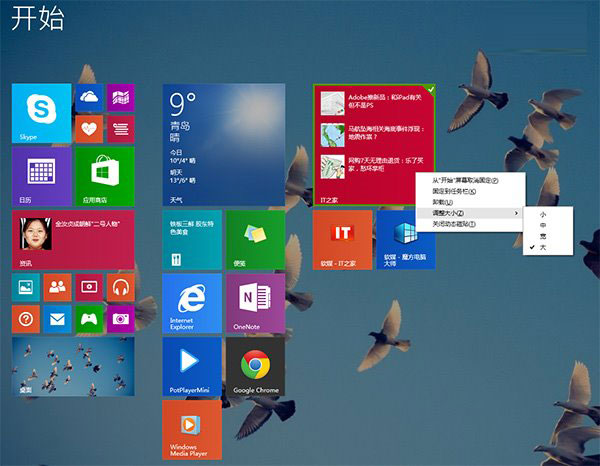
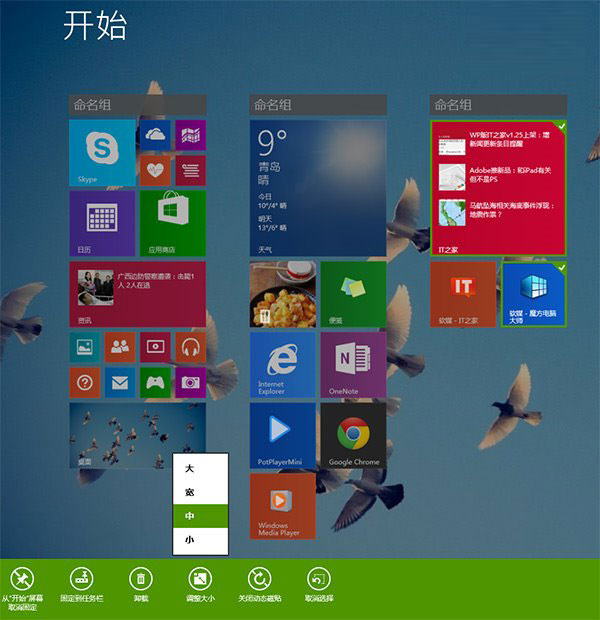
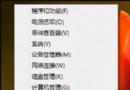
Win8.1 Update 將「開始」畫面的底部工具列移除,改為右鍵選單管理應用程式。許多用戶不習慣新操作,其實只需按一個 空白鍵 即可暫時喚回傳統的 Modern 工具列,支援命名群組、多選管理等功能。
這個隱藏快捷鍵讓習慣舊版操作的用戶能平滑過渡,無需安裝第三方工具即可找回熟悉的管理介面,建議收藏備用。
Windows 8 網路和共用中心完整圖解:開啟方式、介面功能、IP/DNS/MAC 手動設定、網路協定安裝移除
Windows 8 磚貼個人資訊清除四大法:關閉動態、Charms 清除、刪除歷程、群組原則自動清理
Win8 開機慢優化全攻略:msconfig、啟動項精簡與 SSD 升級建議
Win8 設定媒體串流功能完整教學
Win8 開始屏幕磚塊添加陰影美化教程:PS 打造專屬動態磚塊背景
Windows 8.1 應用程式市集閃退解決方案
Windows 8.1 Update WIMBoot 技術詳解:系統直接從壓縮 WIM 映像啟動、節省 50% 以上磁碟空間、限 UEFI+SSD 平台
Windows 8 優化橫直向瀏覽體驗:開發工具支援雙模式測試