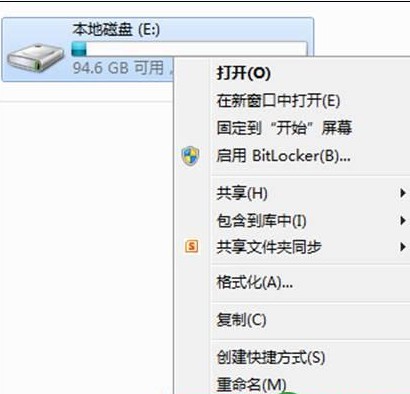
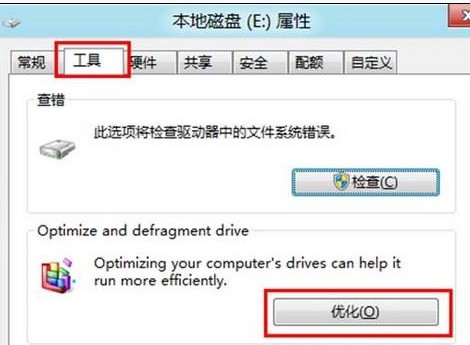
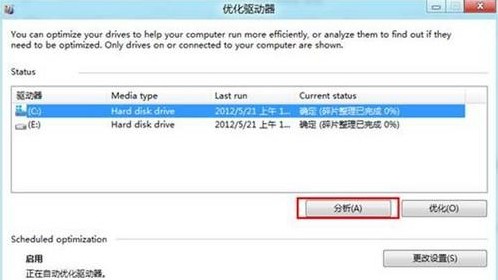
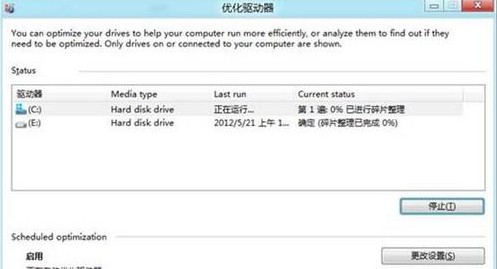
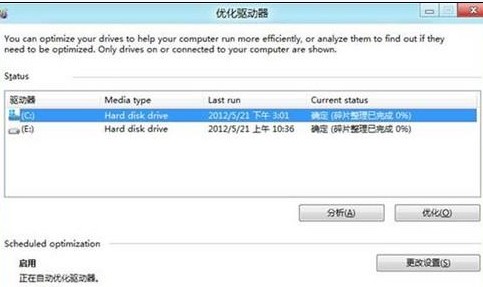
定期進行磁碟重組可提升傳統硬碟讀寫效能,Win8 內建最佳化工具操作簡單。
注意: 固態硬碟 (SSD) 不需磁碟重組,Win8 會自動偵測並執行 TRIM 最佳化,請勿對 SSD 執行傳統磁碟重組。
Win8 設定託管網路 (Wi-Fi 熱點) 完整指令流程:支援查詢支援度、設定 SSID/密碼、啟停控制
Windows 8.1/RT 8.1 新增語言與鍵盤完整指南:顯示語言、語言包、鍵盤版面配置、預設輸入法
Windows 7/8 雙系統存取磁碟「拒絕存取」解決:取得擁有權與完整控制權限圖文教學
Windows 8 無線網卡亮燈卻搜尋不到訊號?啟用 WLAN AutoConfig 服務解決
Win8.1 啟用資料夾核取方塊:滑鼠點選即可多選檔案,告別 Ctrl 點選
Windows 8 設定電腦睡眠時間,平衡省電與即時可用
Windows 8.1 解決開機彈出自動撥號視窗問題
Win 8 系統自動更新太煩人?三步自訂更新安裝時間