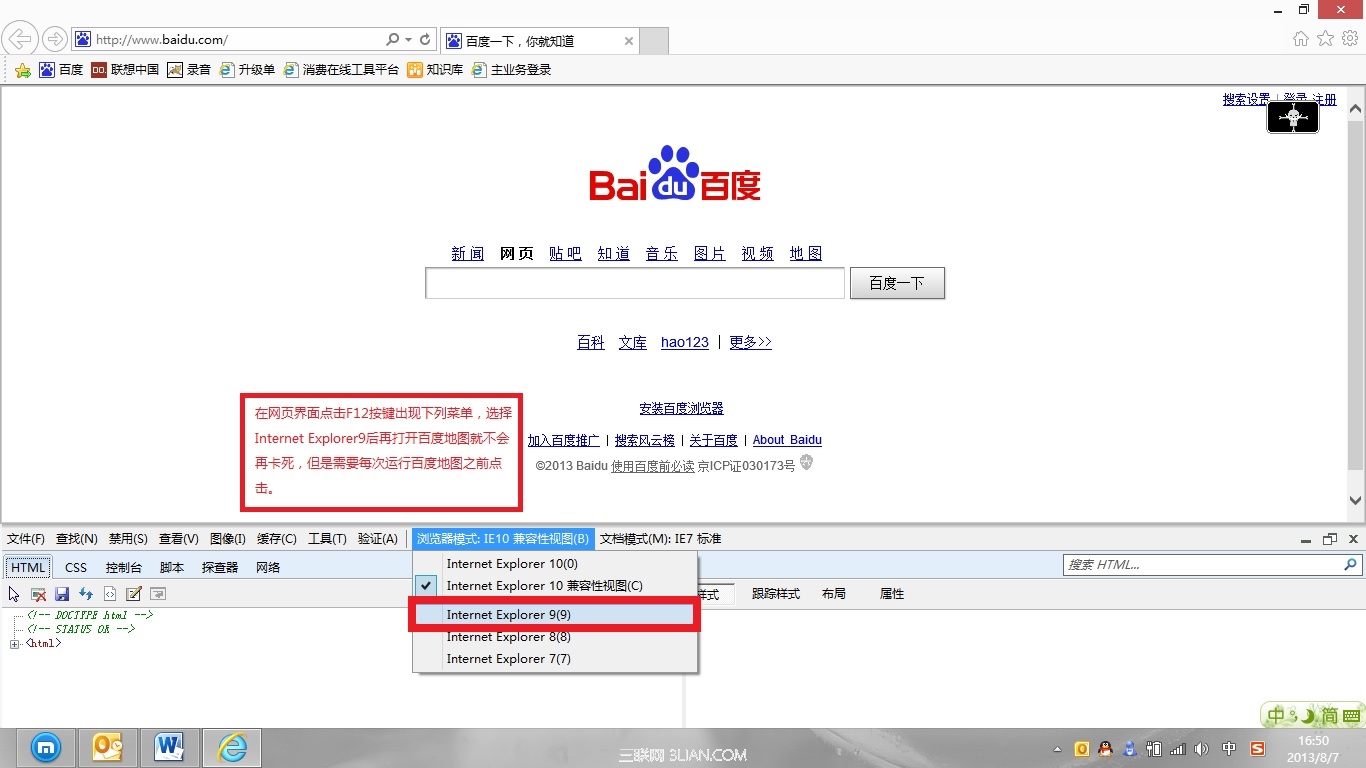
Windows 8 內建 IE10 開啟百度地圖會當機無回應,原因是百度地圖與 IE10 相容性不佳。暫時解法:按 F12 開啟開發人員工具,切換「瀏覽器模式」為 Internet Explorer 9,重新整理即可正常瀏覽(每次開啟需重複操作)。
長期建議升級 IE11 或改用 Chrome/Firefox 等現代瀏覽器。
Windows 8 應用程式切換操作全攻略:滑鼠、觸控與快速鍵
Windows 8.1 無線網路受限/掉線解決:啟用 FIPS 相容性修復相容性問題
Win8.1 內建 SkyDrive 雲端硬碟完整使用攻略:同步、上傳、離線存取
Windows 8 硬碟安裝全攻略:必須使用 source\\setup.exe 而非根目錄 setup.exe
Windows 8 KMS 批量啟動原理與架構深度解析
Windows 8 禁用開機啟動項完整圖文教程
Windows 8 對決 Win7 實測:啟動速度不足 Win7 三分之一,綜合耗時縮短 33 秒
Windows 8 或將搭載類 Siri 語音操控功能