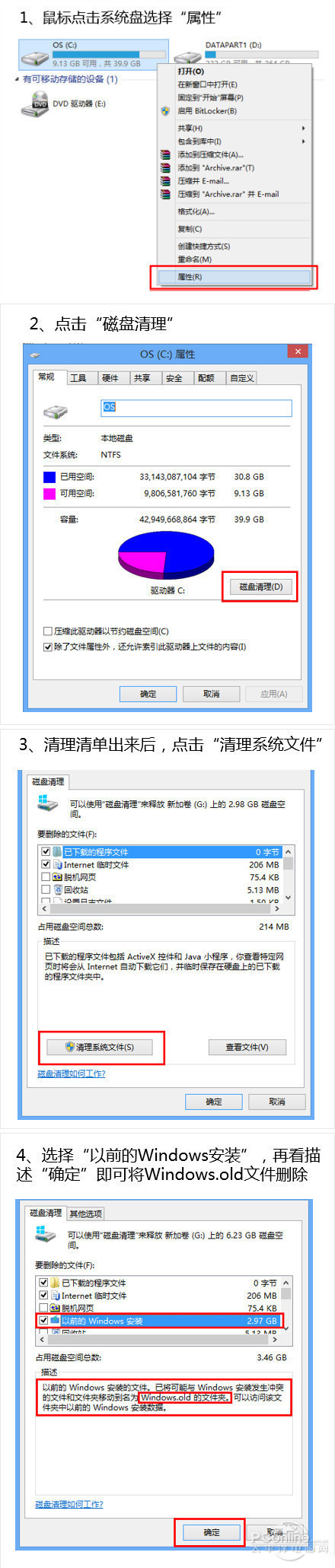
升級 Win8.1 後 C 槽暴瘦,主因是保留 Windows.old 資料夾 (含舊系統檔案)。確認新系統穩定後可安全刪除。
Windows.old
刪除後無法復原至舊版本,請確認升級無問題、重要資料已備份後再執行。
Win8 開始畫面加入一鍵關機磚:建立捷徑釘選教學
Win8/10/11虛擬記憶體還要開嗎?詳細原理與SSD/HDD最佳設定建議
微軟或將在 9 月 PDC 全面演示 Windows 8 並發布測試版
Win8.1 切換本地帳戶完整教學:解除 Microsoft 帳戶綁定
Windows 8 保留的经典 Win 键快捷键速查表:13 组核心组合键无缝传承 Win 7 肌肉记忆
Win8 移除內建中文輸入法教學:新增英文語言包、調整優先序、熱鍵自訂全流程
Windows 8 系統時間自動同步設定:兩種方法對齊網路時間伺服器
DirectX 11.1 在 Windows 8 的七大效能增強細節解析