Windows 8 M2 Build 7955 洩露版本中,RedPill 工具可解鎖四大隱藏功能:Metro 風格登入介面、全新任務管理器、Metro UI 優化的 Immersive 瀏覽器、類似 Android 的圖形密碼登入。本文介紹四大功能特色與 RedPill 使用步驟(取得 System32 寫入權限、備份/替換 `slc.dll` `systemcpl.dll`、複製 RedPill 三檔案)。
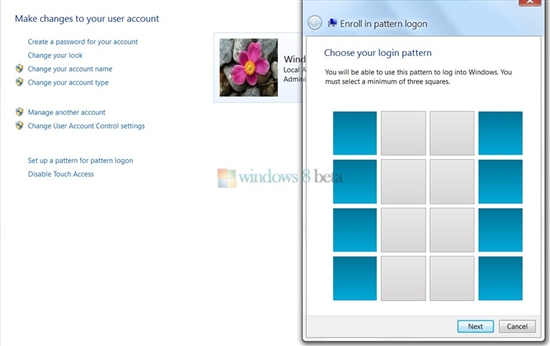
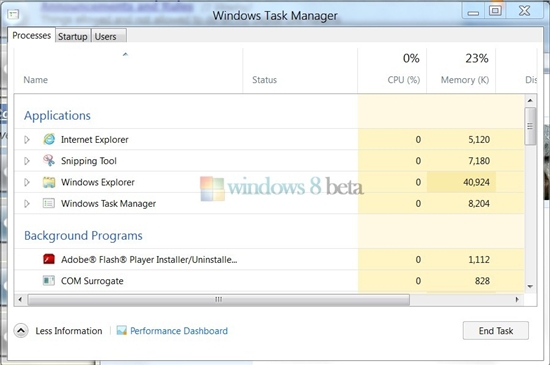
▐ RedPill 啟用後的隱藏功能截圖
RedPill 展示了 Windows 8 開發早期的創新原型,許多概念最終以更成熟形式進入正式版,見證 Metro 設計語言從手機延伸至桌面的演進歷程。
Windows 8 透過群組原則鎖定開始畫面磚塊,防止被誤刪或移動
Windows 8 開機僅需 7 秒:UEFI + SSD 重新定義啟動體驗
Windows 8 防毒防駭九大實務守則:郵件附件、SmartScreen、防毒軟體、防火牆、隱私設定、UAC 全方位防護
Win8 音訊服務未執行?services.msc 重新啟動 Windows Audio 服務
Windows 8 開啟休眠選項完整教學:控制台電源選項顯示休眠
Win8 實現免密碼自動登入:netplwiz 取消勾選 + 應用商店付費購買流程 (信用卡/帳單管理)
Windows 8 安全性能提升详解:Defender 全能化、SmartScreen 双引擎、安全启动、ELAM 早期反恶意,或可免装第三方杀毒