Windows XP Windows 7 Windows 2003 Windows Vista Windows 綜合教學 Linux 系統教學
Windows 10 Windows 8 Windows 2008 Windows NT Windows Server 電腦軟體教學

Windows 8.1 Update 更新錯誤 80070020/80073712/0x800f081f 修復方案

編輯:Windows 8 系統介紹

Windows 8.1 Update (KB2919355) 安裝常見三大錯誤代碼:80070020、80073712、0x800f081f。微軟社區專家 Andrew B 提供兩行 DISM 指令即可修復,原理同移除故障套件並清理元件存放區。

修復步驟 (管理員權限 CMD)

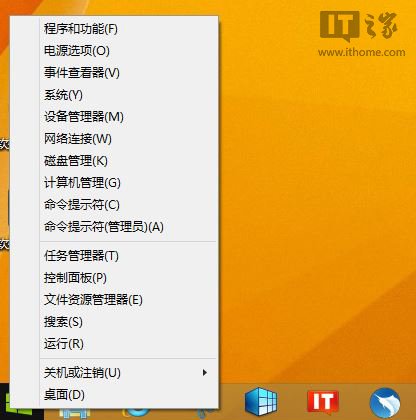
  1. 桌面右鍵「開始」 → 「命令提示字元 (管理員)」。
  2. 移除故障更新套件 (64 位元範例):
    dism /online /remove-package /packagename:Package_for_KB2919355~31bf3856ad364e35~amd64~~6.3.1.14
  3. 執行完成後手動重新開機完成組態還原。
  4. 再次以管理員身分開啟 CMD,清理元件存放區:
    dism /online /cleanup-image /startcomponentcleanup
  5. 重新開機後,開啟 Windows Update 重新檢查並安裝 Windows 8.1 Update。

管理員命令提示字元

補充說明

  • 套件名稱可能因版本不同,若指令報錯請用 dism /online /get-packages | find "KB2919355" 確認確切名稱。

  • 此法同適用於 KB2919355 以外的更新套件移除,只需替換套件名稱。
  • 操作前建議建立系統還原點。
Copyright © Windows教程網 All Rights Reserved