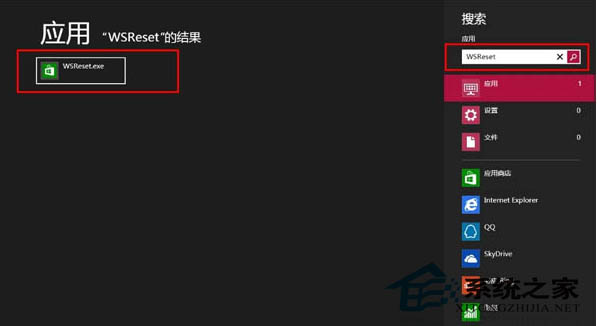
Win8 應用商店快取預存於系統盤,長期累積會佔用大量空間。系統內建 WSReset.exe 可一鍵清理,無需第三方工具。
WSReset.exe
WSReset
清理後系統盤空間釋放明顯,商店運作也更順暢。建議定期執行。
Windows 8 快速找到「啟動」資料夾:顯示隱藏檔案、路徑位置、開機自動執行程式
Win8 一鍵切斷所有無線網路:飛行模式隱藏技巧
Windows 8 無法登入解決方案:Microsoft 帳號驗證、密碼重設磁碟與重置流程
Windows 8 開啟或關閉 Windows 功能:Hyper-V 為例
Win8 開啟計算機:開始畫面「所有應用程式」→ Windows 配件 → 計算機
Windows 8 提升使用者體驗從語言支援開始:109 種顯示語言任意切換
Win8 內建 Dxdiag 指令查看硬體規格:免安裝第三方工具
外媒盤點 Windows 8.1 (Blue) 應改進的 13 項關鍵功能