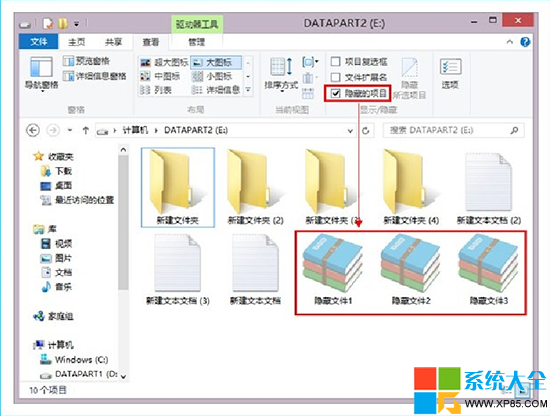
Windows 8 檔案總管將「隱藏的項目」選項直接放在「檢視」索引標籤上,無需進入資料夾選項即可一鍵切換隱藏檔案顯示/隱藏,比舊版本更便捷。
若需調整「隱藏受保護的作業系統檔案」等深層選項:
Win8 關機卡住「正在關機」無法完成?群組原則啟用「自動終止阻止關機的應用程式」
Win8 建立圖片密碼完整教學:手勢組合登入、觸控優化、傳統滑鼠體驗差
Windows 8 同步助手無法開啟?手動安裝 .NET Framework 3.5 完整圖文教學
Windows 8 Consumer Preview 無法上網?網卡驅動衝突解決實錄
Windows 8/7 雙系統安裝實戰筆記:VHD 引導修復與體驗心得
Windows 8 系統重置功能:快速重裝並保留激活狀態完整教學
Windows 8 進階操作技巧大全(二):查看所有應用、關機捷徑、恢復開始選單、桌面啟動 Metro、USB 安裝、SmartScreen、64位 IE、Hyper-V、早期反惡意軟體、檔案歷程記錄、USB 備份、控制台、圖片密碼、搜尋簡化、觸控鍵盤、選擇性同步、完整控制台、Ribbon 介面
Win 8 網路和共享中心完整指南:開啟方式、介面介紹、IP/DNS/MAC 設定、協定安裝