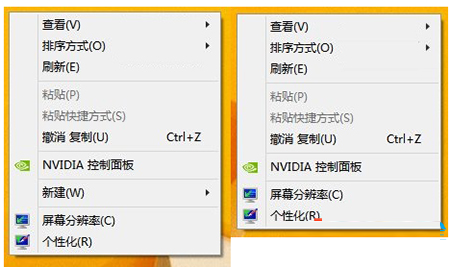
正常右鍵有「新建」,異常無。
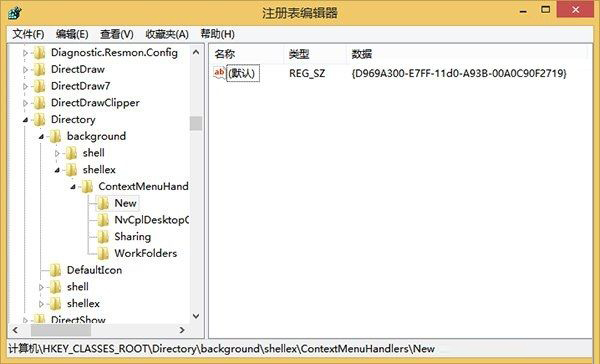
regedit
HKEY_CLASSES_ROOT\Directory\Background\shellex\ContextMenuHandlers\New
{D969A300-E7FF-11d0-A93B-00A0C90F2719}
為 Surface RT 製作 USB 復原磁碟:官方工具完整教學,系統損壞也能救援
Win8/Win8.1 免輸入產品金鑰安裝技巧:使用 ei.cfg 跳過序號驗證
Windows 8 筆電合蓋動作設定:喚醒即用、省電無憂
Win8 C 槽空間不足怎麼辦?動態磁碟擴充實戰紀錄
Win8.1 輕鬆玩轉內建 SkyDrive (OneDrive) 雲端硬碟:四大實戰操作技巧
Win8 清除應用商店快取:wsreset.exe 一鍵重置解決卡頓異常
Win8 圖片依解析度排序?檔案總管「詳細資料」欄位自訂技巧
Windows 8 電話啟用完整圖文教學