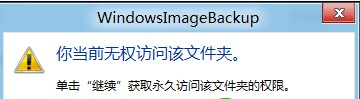
Windows 8 備份產生的 VHD 虛擬硬碟檔案預設受保護,雙擊會提示「您目前沒有權限存取此資料夾」,解決方法極簡單:
WindowsImageBackup\使用者名稱\Backup 備份時間
補充:VHD 掛載後會出現為新磁碟機代號,可像一般磁碟機複製、還原個別檔案。使用完畢請在磁碟管理中「卸載 VHD」避免資料損毀。
Win8 Metro 版人人網登出教學:三種常見登出路徑
Win 8 桌面直接啟動 Modern Apps:建立捷徑技巧
XP 升級 Windows 8 磁碟分區重命名失敗解決:登錄修改 DriveIcons 設定磁碟標籤
Windows 8 資源管理員 Ribbon 介面完整解析:快速存取工具列、索引標籤、收合展開
Windows 8 關機秘技大公開:Charms 列、Alt+F4、工作管理員、shutdown 指令四大法
微軟宣布:Windows 8 將取消桌面小工具支援
Windows 8 透過群組原則鎖定開始畫面磚塊,防止被誤刪或移動
Internet Explorer 關閉多重分頁關閉警告視窗設定教學