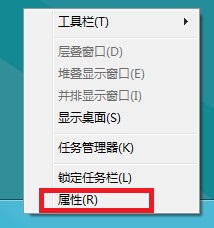
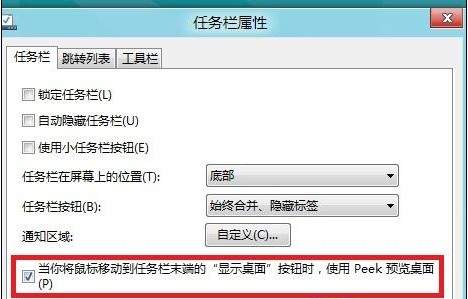
Aero Peek 功能讓您將滑鼠移至工作列最右端「顯示桌面」按鈕時,自動預覽桌面內容。以下為開啟/關閉設定:
此功能對多視窗作業者極為實用,可快速瞥見桌面小工具或檔案,不必最小化所有視窗。
Windows 8 如何恢復經典開始選單?註冊表一鍵切換技巧
Windows 8 電腦還原、重新整理、重設完整指南:保留檔案與完全重裝的差異
Win8.1 升級 Win8.1 Update 簡易兩步驟教學
Win8 升級 Win8.1 遭遇黑屏、藍屏?雙顯卡驅動衝突完整解決方案(含預防與事後補救)
升級安裝 Win8 後刪除 Windows.old 釋放磁碟空間
Win8 如何設定 IE 在新分頁開啟連結
Windows 8/8.1 進入安全模式完整教學:三種方法適用不同情境
Win 8.1 IE11 無法上傳圖片到 QQ 空間?關閉保護模式即可解決