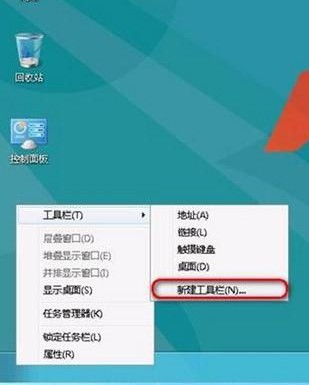
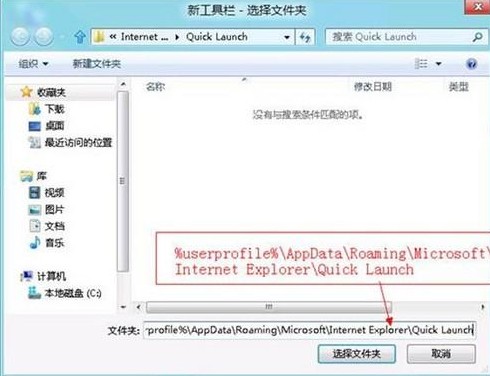
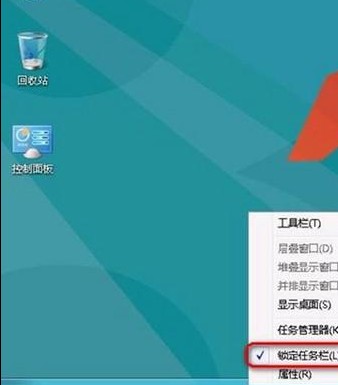
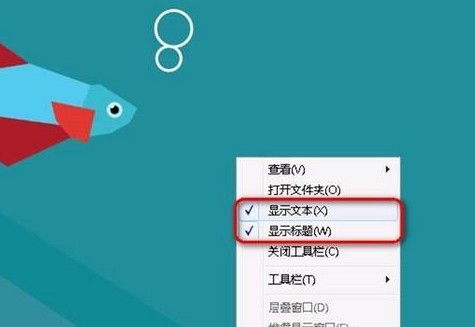
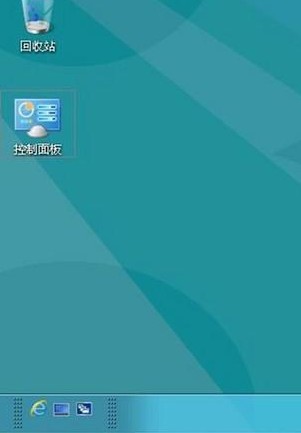
Windows 8 預設移除了經典的「快速啟動列」,但可透過以下步驟手動恢復:
%userprofile%\AppData\Roaming\Microsoft\Internet Explorer\Quick Launch
恢復後可像 Windows 7 一樣,將常用程式捷徑拖放至快速啟動列,單點即啟,大幅提升操作效率。
Windows 8 查看元件服務(COM+):管理工具開啟、事件檢視器、服務啟停
Windows 8 整合 Windows Live ID:雲端同步設定、應用與檔案
Windows 8 無線網路不穩定解決方案:網卡進階屬性、TCP/IP 指令與路由器設定三管齊下
Windows 8 檔案歷程記錄常見問題與解決方案:磁碟空間不足、離線、網路認證錯誤
Windows 8 執行程式提示「從伺服器傳回一個參考」解決教學:UAC 權限三大修復法
Windows 8 任務排程器完整教學:建立基本工作與進階工作(定時關機、提醒、自動備份)
Win8 無線網卡承載網路不可用解決方法
Win8 啟動新機制:產品金鑰內嵌 BIOS,重裝免輸入、防盜用、但升級版本與自組裝機面臨挑戰