Win7 下支付寶/數位憑證常失效,完整設定步驟:
800A138F
80070057
xenroll.dll
C:\Windows\System32
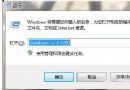
regsvr32 xenroll.dll
完成上述設定即可正常使用支付寶與數位憑證。
流氓軟體強制修改 IE 首頁?群組原則鎖定首頁永不被篡改
Win7 共享無線網路 (Wi-Fi 熱點) 導致藍屏/重開機?Intel 5100 AGN 驅動 13.5 版有 Bug,降級 13.0/13.1 版解決
Windows 7 五大核心優勢:穩定、相容、低門檻、快速啟動、安全防護
Windows 7 BitLocker To Go 入門(一):行動存儲加密必備,防遺失防洩密,專業版/旗艦版專屬
Windows 7 任務列滑動手勢開啟 Jump List:觸控/筆電觸控板必學
Win7 為何自動建立 100MB 隱藏分區?存放開機檔案支援大叢集/非 NTFS 系統分區
巧用 Windows 7 查看無線密碼不求人
移除 Windows 7 登入畫面版本 Logo:資源修改工具實戰教學