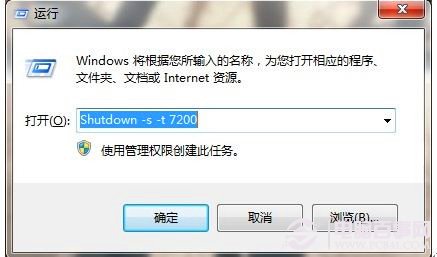
無需第三方軟體,Windows 7 內建 shutdown 指令即可輕鬆排程自動關機:
shutdown
shutdown -s -t 7200
補充:若要取消已排程的關機,同樣開啟「執行」輸入 shutdown -a 即可中止。
shutdown -a
USB 隨身碟無法安全移除?五大解決方案與預防技巧
Windows 7 開啟 SuperBar 後禁用傳統快速啟動列:群組原則一鍵管教
讓 Win7 資源管理器也有「防當機」:啟用獨立進程模式
Windows 7 預設 IE8 最小視窗限制 250x100 像素:無法像 Chrome/Firefox 任意縮小
五大妙計強化 Vista/Windows 7 安全性:打補丁、拒盜版下載站、禁用自動播放、顯示副檔名、謹慎開附件
Windows 7 任務管理員進階功能:UAC 虛擬化、CPU 親和性、資源監視器抓木馬全解析
Windows 7 記錄詳細登入時間 讓偷看電腦者無所遁形
Windows 7 執行指令大全:45 個常用 run 命令快速啟動系統工具