Windows XP Windows 7 Windows 2003 Windows Vista Windows 綜合教學 Linux 系統教學
Windows 10 Windows 8 Windows 2008 Windows NT Windows Server 電腦軟體教學

Win7 自然語言搜尋:忘記檔名也能找到檔案

編輯:Win7 系統基礎知識

忘記檔名、存放位置、副檔名?Win7 資源管理器支援自然語言搜尋,像說話一樣輸入查詢條件即可精準找到檔案。
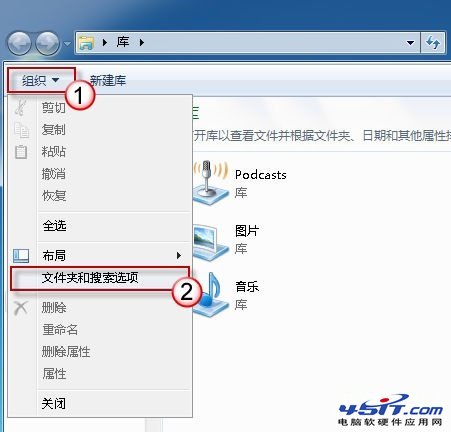
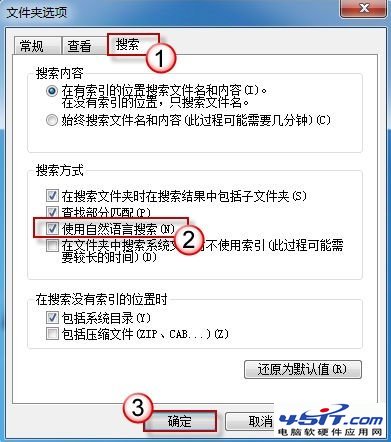
啟用自然語言搜尋

  1. 資源管理器 → 「組織」 → 「資料夾和搜尋選項」。
  2. 切換「搜尋」索引標籤 → 勾選 「使用自然語言搜尋」 → 確定。

資料夾和搜尋選項

勾選自然語言搜尋

使用範例

在搜尋框輸入:

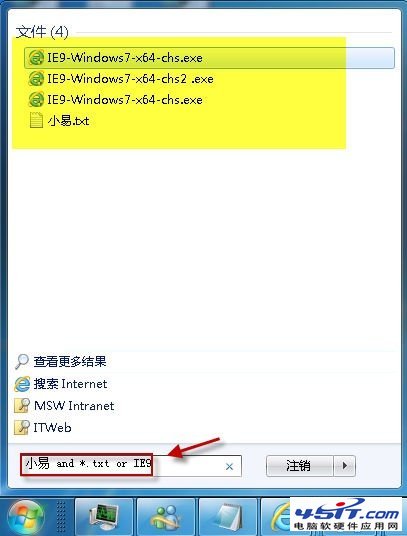
  • 小易 and *.txt → 找出檔名含「小易」且副檔名為 txt 的檔案。
  • IE9 or Chrome → 找出檔名含「IE9」或「Chrome」的檔案。
  • modified last week → 找出上週修改過的檔案。
  • size > 10MB → 找出大於 10MB 的檔案。

自然語言搜尋範例

關鍵字說明: and = 且、or = 或、not = 不包含。支援屬性:name:、type:、size:、date:、modified:、tags: 等。善用自然語言搜尋,毋須記住檔名也能秒找目標檔案。

Copyright © Windows教程網 All Rights Reserved