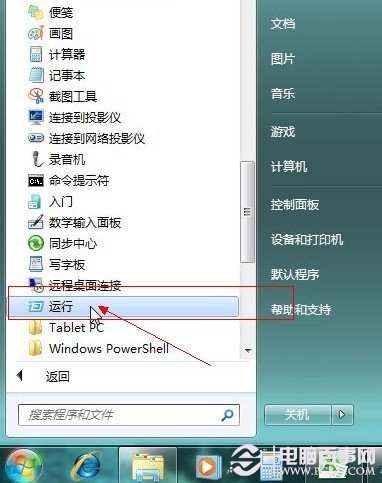
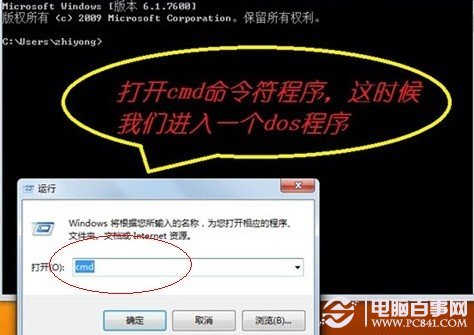
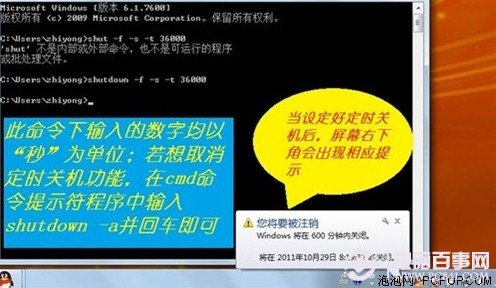
Win7 無直觀「自動關機」按鈕,但可用 shutdown 指令或工作排程器實現。
shutdown
cmd
shutdown -s -t 3600
shutdown -a
參考文章 3467 完整步驟,動作設 shutdown -s -t 3600,觸發條件可設每天/每週/單次。
迅雷/其他下載軟體常內建「下載完成關機」功能,優先使用軟體自帶功能更精準。
Win7 修改開啟方式導致所有程式變成同一個?INF 檔一鍵還原檔案關聯
建立 Windows 7 標準帳戶:提升系統安全的第一道防線
Win7 下安裝 SQL Server 2000 完整教學:啟用 Administrator 帳號法
深度解析 Windows 7 裝置驅動管理:驅動程式庫架構、數位簽章重要性、內建診斷與排錯流程
找回 Windows 7 隱藏的 Windows Mail(下):取得權限與啟動郵件用戶端
Win7 內建批次重新命名照片:一鍵完成千張檔案更名
Win7 內建燒錄功能:無需第三方軟體即可燒錄資料/音樂光碟
360 極速瀏覽器清除快取/瀏覽紀錄完整步驟教學