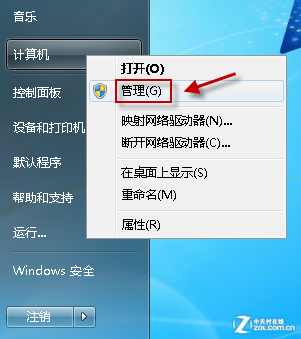
動作中心彈出「無法啟動 Windows 資訊安全中心服務」,修復:
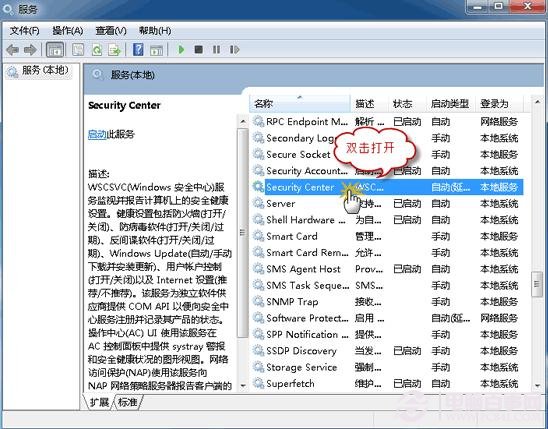
services.msc
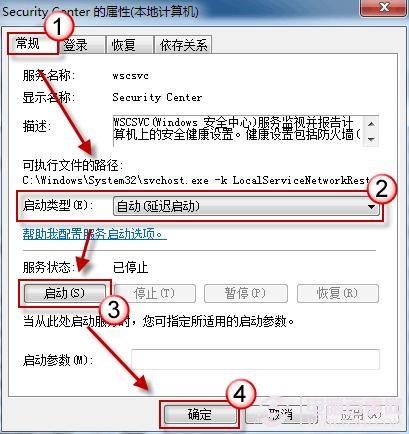
Security Center
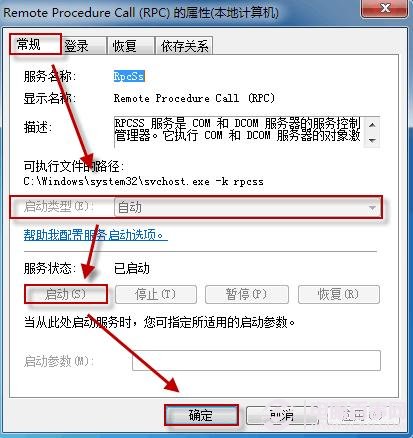
Remote Procedure Call (RPC)
Windows Management Instrumentation
三項服務缺一不可,啟用後動作中心即可正常監控防火牆、防毒、更新等安全狀態。
Windows 7 絕對不能關閉的 10 大服務(下):Workstation、NLA、DHCP、加密服務
善用 Windows 7 內建磁碟清理工具,拒絕第三方垃圾清理軟體
Win7 如何合併磁碟分區?磁碟管理工具免重裝系統擴展磁碟區教學
Win7 群組原則隱藏系統盤:防誤刪、防好奇、連「執行」都進不去
Windows 7 省電不斷網:啟用 Away Mode 讓下載、工作持續運行同時降低功耗
實測:單核心 CPU 能跑 Windows 7 嗎?效能與體驗完整報告
Windows 7 系統檔案損毀怎麼修復?SFC 指令掃描修復完整教學
Windows 7 開始功能表「所有程式」消失?群組原則禁用「從開始功能表移除所有程式」恢復顯示