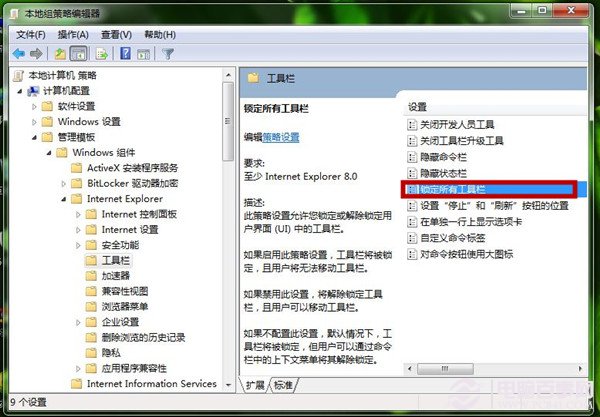
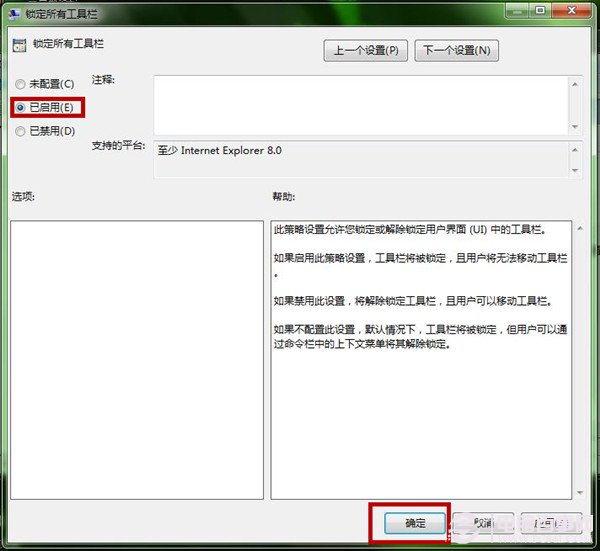
IE 工具列常被誤拖移、隱藏導致找不到按鈕?群組原則「鎖定所有工具列」強制固定配置,適合企業/學校/公用電腦統一管理。
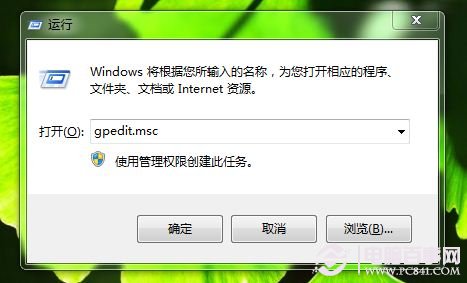
gpedit.msc
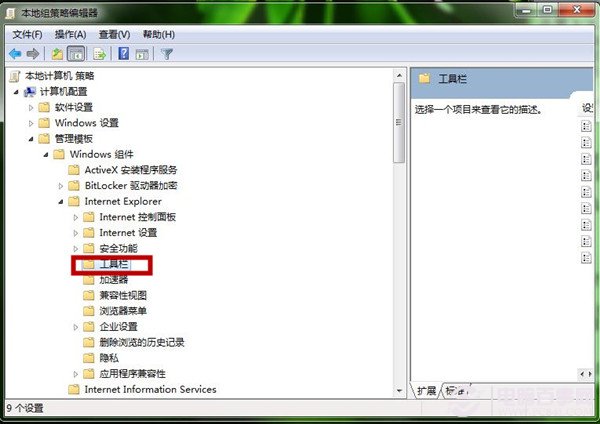
電腦設定 → 系統管理範本 → Windows 元件 → Internet Explorer → 工具列
Professional/Ultimate/Enterprise 可用 gpedit.msc;Home 版可匯入對應 .reg 檔或用第三方原則工具。
工具列鎖定,瀏覽介面永遠整齊!
Windows 7 與 XP 局域網共享權限詳解:NTFS 權限才是關鍵
Win7下安裝XP雙系統完整圖文教程(三種方法任選)
Windows 7 隱藏 C 槽防熊孩子誤刪:群組原則「僅限制磁碟機 C」保護系統分區
Win7 Permissions 一鍵取得系統檔案控制權,免去繁瑣手動提權步驟
Windows 7 安裝 IPX/SPX 協定,解決區網舊遊戲(紅警、魔獸)無法聯機
如何乾淨安裝純淨版 Win7?硬碟安裝法避免 OEM 預裝垃圾軟體
MSDN 原版 Win 7 SP1 好不好?需不需要自己裝驅動?優化迷思解析
Windows 7 播放影片出現鋸齒/馬賽克?顯示卡驅動與視覺效能設定雙管齊下解決