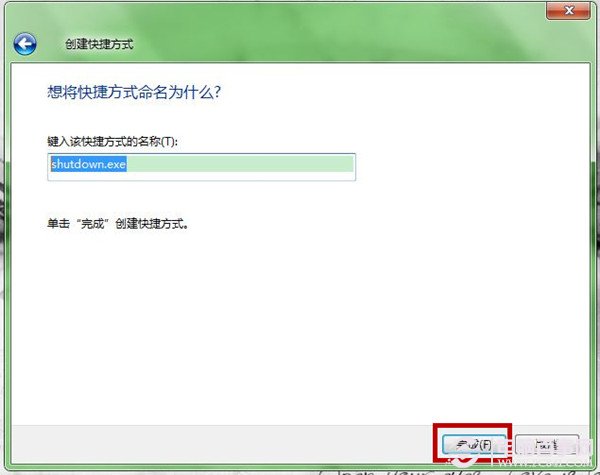
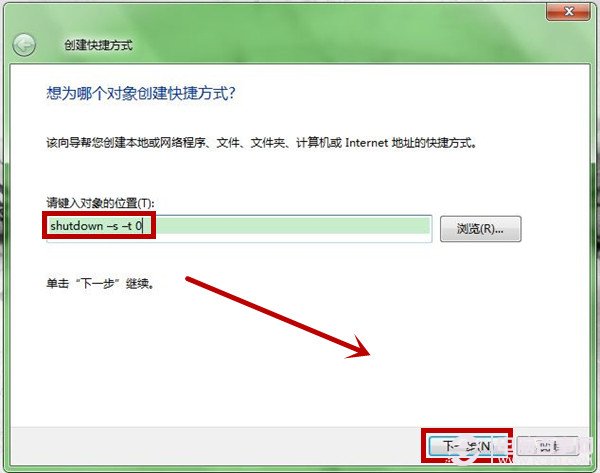
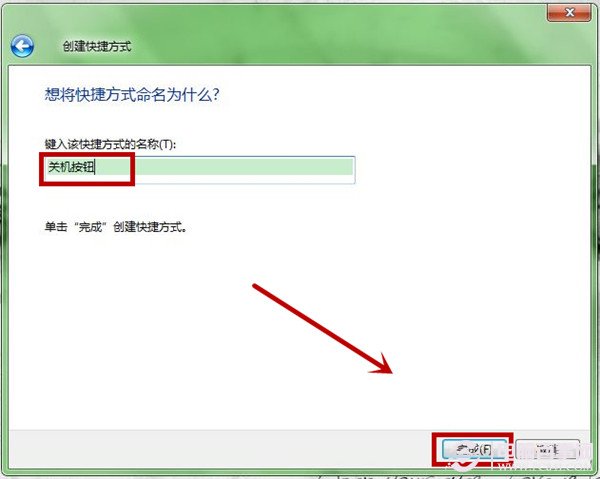
長輩找不到開始功能表關機選項?桌面建立「關機按鈕」捷徑,雙擊即關機,操作零負擔。
shutdown -s -t 0
桌面出現「關機按鈕」圖示,雙擊立即執行關機序列 (參數 -s 關機、-t 0 延遲 0 秒)。
-s
-t 0
shutdown -r -t 0
shutdown -l
rundll32.exe user32.dll,LockWorkStation
你的電腦適合安裝 Windows 7 嗎?七大關鍵檢核點
硬碟壞軌前兆大公開:邏輯/物理壞軌差異、四大警訊與預防重點
安裝 Win7 後 0x00000124 藍屏 Debug 分析:Ntkrnlpa.exe 被補丁替換導致
Win7 任務列電池圖示消失?群組原則「移除動作中心圖示」設為未啟用,再開啟通知區域圖示即現
Win7 開啟 USB 隨身碟提示「I/O 裝置錯誤」?重新指派磁碟代號嘗試修復
為 Windows 7 建立備份開機防範啟動故障:GRUB 多重引導 + 多備份 BCD/bootmgr + WinPE 急救完整部署
BIOS 設定讓 Win7 運行速度更快:開啟 AHCI 模式
Windows 7 執行指令大全:71 個實用 run 指令快速開啟系統工具