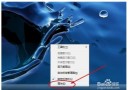
想知道電腦開機花了幾秒?Win7 事件檢視器記錄了精確到秒的開機時間。
6013
技巧:右鍵「來源」欄位排序,僅查看 EventLog 來源,可快速比較一段時間內的開機速度快慢。
EventLog
Windows 系統 7 大獨門執行技巧(上)
Win7/Win8 右鍵選單消失「新增」選項?登錄表修復教學
移除 Windows 7 多餘開機選單:msconfig 圖形介面或 bcdedit 指令修改預設項目
IT 專業人員必知 Windows 7 十大特性(下):PowerShell 2.0、疑難排解、DISM、VHD/WIM、動態驅動、多點傳送、USMT 硬連結、BranchCache、客戶端虛擬化
32 位元 vs 64 位元 Windows 7:效能差一倍?選擇指南
Windows 7 遊戲相容性測試清單:40+ 款大作完美執行
USB 埠無反應?自檢裝置/驅動/BIOS/硬體四大面向排查指南
Windows 7 善用憑證管理器提高存取速度