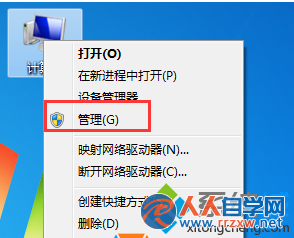
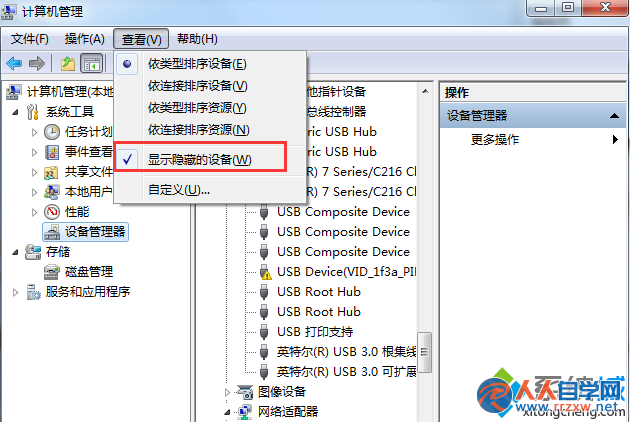
嘗試存取區域網路共用資料夾時,跳出錯誤碼 0x800704cf,無法瀏覽共用內容。
0x800704cf
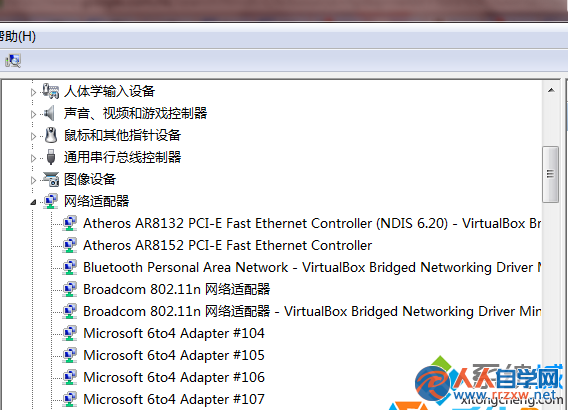
Microsoft 6to4 Adapter #數字
殘留的 6to4 轉換介面卡導致 IPv6 協定堆疊混亂,干擾 SMB/CIFS 共用協定。清除後系統自動重建正常介面卡。
Win 7 記事本快速插入當前時間:.LOG 技巧與 F5 熱鍵、輸入法替代方案
Win7 將 USB 隨身碟還原出廠狀態:格式化與量產工具兩大法
Win7 能當無線路由器嗎?兩招 10 秒檢測網卡是否支援虛擬 Wi-Fi
Win7 系統變慢、佔空間?找出兩大元凶並徹底優化
Win7修改TXT文本無法存檔?一招移除「唯讀」屬性秒解決
Win7 無法存取 NAS/Samba 伺服器?修改登錄檔相容性層級即可解決
Win7 檔案總管預設開啟指定資料夾:自訂啟動目錄提升工作效率
Win7 小工具脫離側邊欄自由擺放,桌面空間隨心佈局