Windows XP Windows 7 Windows 2003 Windows Vista Windows 綜合教學 Linux 系統教學
Windows 10 Windows 8 Windows 2008 Windows NT Windows Server 電腦軟體教學

Win7 雙擊資料夾卻彈出搜尋視窗?刪除登錄 shell\find 修復

編輯:Win7 常見問題解答

Win7 旗艦版偶發怪象:雙擊資料夾不開啟內容,反而跳出「搜尋」視窗;唯有右鍵選「開啟」才能正常進入。原因是登錄 HKEY_CLASSES_ROOT\Directory\shell 下誤建立 find 子鍵並成為預設動作。

修復步驟

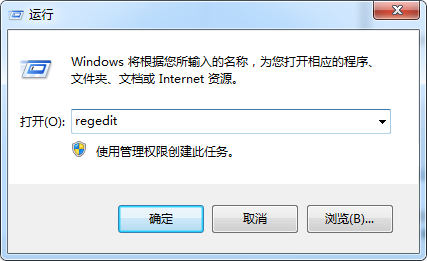
  1. 按 Win+R 輸入 regedit 開啟登錄編輯器。
  2. 瀏覽至:
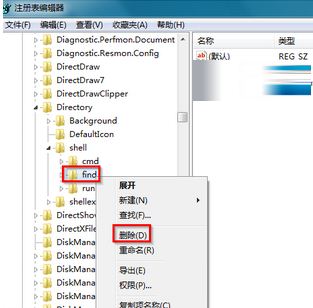
    HKEY_CLASSES_ROOT\Directory\shell
  3. 展開 shell,找到 find 子鍵,右鍵「刪除」。
  4. 關閉登錄編輯器,即時生效(無需重開機),雙擊資料夾恢復正常開啟。

開啟登錄編輯器

定位 shell\find 子鍵

成因分析

  • 安裝第三方搜尋工具、右鍵選單擴充套件時,可能將「搜尋」寫入 Directory\shell 並置頂。
  • 登錄 shell 下第一個子鍵(或有空字串值的子鍵)會成為雙擊預設動作。

刪除多餘 find 鍵值後,預設動作自動回落至 open,問題徹底解決。

Copyright © Windows教程網 All Rights Reserved