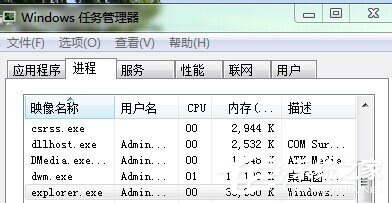
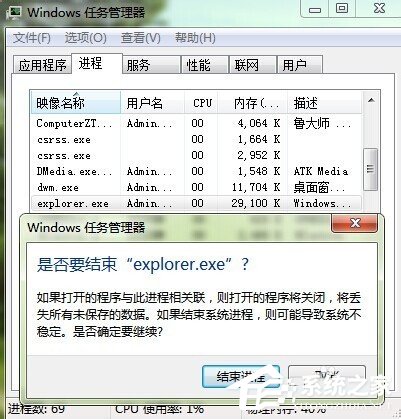
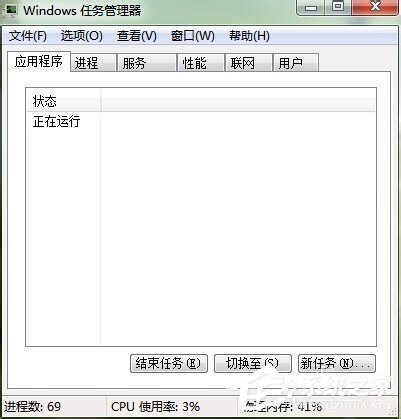
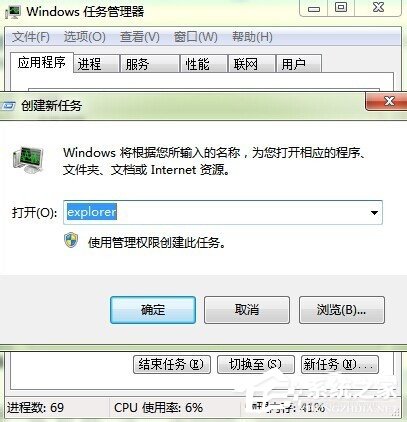
Win7 開機進入桌面卻只有背景圖片,無工作列、無圖示、無右鍵選單,主因是 explorer.exe (殼程式) 未正常啟動或當機。透過工作管理員結束並重新啟動 explorer 即可秒恢復。
explorer.exe
explorer
桌面即刻恢復正常。若頻發,請檢查:開機啟動項衝突 (msconfig)、第三方殼擴充套件 (右鍵選單工具)、病毒感染、系統檔損毀 (sfc /scannow)、使用者設定檔損壞 (建立新帳號測試)。
sfc /scannow
Win7 微軟官方優化工具 Microsoft TweakUI 使用教學:右鍵加密、去除捷徑箭頭、移動系統資料夾
Win7 藍屏 0x00000040:網路名稱衝突,刪除多餘連線、停用閒置網卡
Windows 7「死亡黑畫面」問題解決方案
Win7 IE11 降級回 IE10 完整圖文教學:透過「已安裝的更新」移除
Win7 卸載 CAD 後無法重新安裝?徹底清除註冊表 Autodesk 殘留鍵值解決「已安裝」誤報
Windows 7 家庭群組:家庭網路資源共享零設定
Win7 還原系統預設字型 (微軟正黑體) 兩步驟完成
Win7 手動建立寬頻撥號連線(PPPoE)與桌面捷徑一鍵撥號全教學