部分 Win7 裝置在安裝 2016 年 3 月推出的 KB3133977 更新後,重開機卡在 Logo 或直接黑屏。此補丁修改了 UEFI 啟動相關機制,導致啟動載入器驗證失敗。解決核心在於 BIOS 設定調整。
BIOS 設定修正步驟(適用 UEFI + GPT 磁碟環境)
- 開機連按 Del/F2 進入 BIOS。
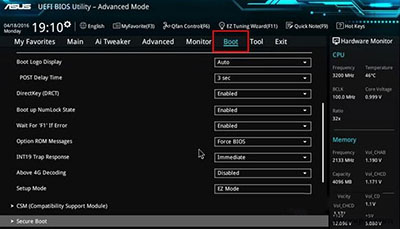
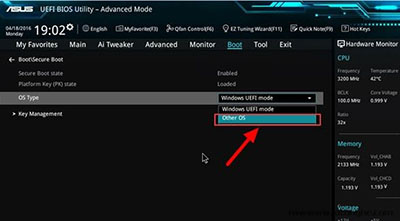
- 找到 Boot 或 Security 頁籤 → Secure Boot → 設為 Enabled(開啟)。
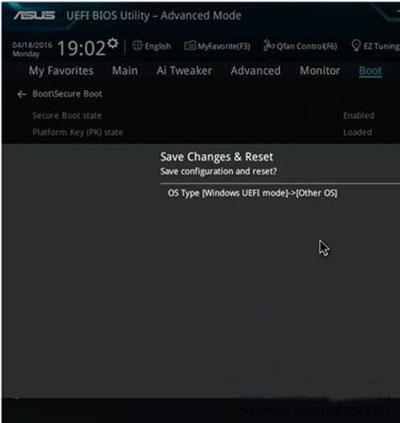
- 在 OS Type / Boot Mode 中,將原本的 Windows UEFI Mode 改為 Other OS(或 CSM/Legacy)。
- 按 F10 儲存並重啟。
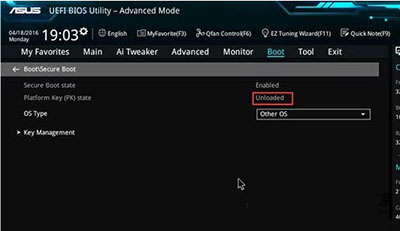
- 再次進 BIOS,確認 Platform Key (PK) State 顯示 Unloaded,即表示 Secure Boot 金鑰已卸載,Windows 可正常啟動。
進入系統後必做:移除問題更新
- 控制台 → 程式和功能 → 檢視已安裝的更新。
- 找到 KB3133977 → 右鍵「解除安裝」。
- 重開機驗證正常後,可在 Windows Update 隱藏此更新,避免再次安裝。
補充:若主機板 BIOS 無 OS Type 選項,嘗試關閉 Secure Boot 並啟用 CSM (Compatibility Support Module) 同樣可解決。