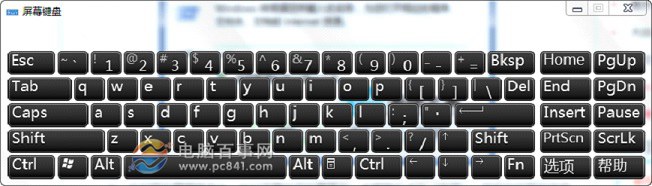
Win7 數字小鍵盤 NumLock 無法切換,多為系統設定導致數字鍵盤功能被關閉。兩步驟恢復:
OSK
效果:實體鍵盤 NumLock 立即恢復正常切換。若仍無效,請檢查鍵盤硬體、更換 USB 埠、或更新鍵盤驅動程式。
Win7 設定關機等待時間,調整 WaitToKillServiceTimeout 註冊鍵值
Win7 IE8 登不上網銀?修改註冊表銀行驅動 Image Path 精準修復
Windows 自動更新卡在最後進度條不動?別硬關機,試試重啟、清理更新緩存或用 360 快速裝機
Win7 右鍵磁碟新增「磁碟重組」:登錄建立 runas 分支與 Extended 鍵值一鍵啟動
Win7 解決 aliedit.dll 遺失錯誤:重新註冊與清理完整流程
Win7 開機藍屏 bbrowserboost.sys 怎麼辦?兩種解決方案快速修復
Win7 桌面捷徑無法開啟?修復 .lnk 關聯教學
Win7 查詢開放連接埠號:netstat 指令一鍵搞定