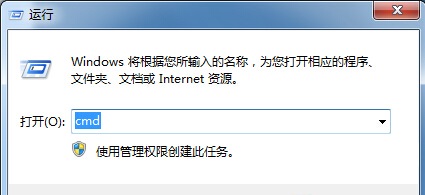
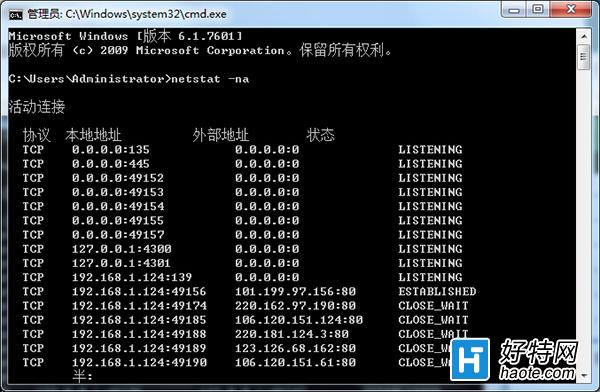
想知道系統目前開放哪些連接埠?開啟命令提示字元輸入 netstat -na 即可列出所有連接埠狀態(監聽、建立連線等)。
netstat -na
cmd
輸出欄位說明: Proto 協定 | Local Address 本地位址:埠 | Foreign Address 遠端位址:埠 | State 狀態(LISTENING/ESTABLISHED 等)。
橙光遊戲中心能在平板電腦下載嗎?安卓/iPad 安裝教學與常見問題
Chrome 佔用 200MB+ 記憶體?啟用「自動捨棄分頁」釋放資源
Win7 提示「本次操作因這台電腦的限制而被取消」?群組原則限制磁碟存取解除法
Win7 圖片與傳真檢視器無法看圖?重新註冊 shimgvw.dll 或補回檔案修復
Win7 SQL Server 2008 無法連線資料庫?啟動 MSSQLSERVER 服務即可
Win7创建系统还原点:系统属性-系统保护-选择C盘-创建还原点命名保存
玩 LOL 進載入畫面就藍屏?聲音正常卻進不去遊戲的排查指南
Windows 7 網路電視常見 8 大問題與解答