Windows XP Windows 7 Windows 2003 Windows Vista Windows 綜合教學 Linux 系統教學
Windows 10 Windows 8 Windows 2008 Windows NT Windows Server 電腦軟體教學

Win7 移除桌面 IE 圖示:登錄檔刪除 Desktop NameSpace 鍵值

編輯:Win7 系統應用技巧

Win7 桌面的 IE 圖示若無法透過右鍵刪除,可透過登錄檔刪除對應的 Desktop\NameSpace 項目來隱藏。

操作步驟

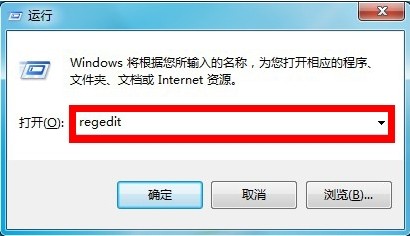
  1. Win+R 輸入 regedit 開啟登錄檔編輯器。
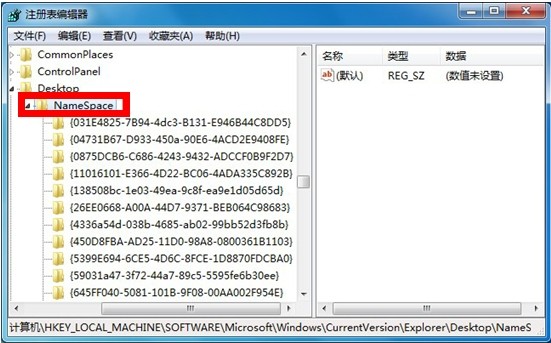
  2. 展開至:
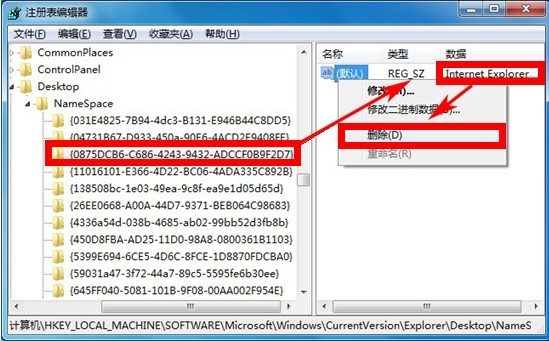
    HKEY_LOCAL_MACHINE\SOFTWARE\Microsoft\Windows\CurrentVersion\Explorer\Desktop\NameSpace
  3. 在 NameSpace 下尋找預設值為「Internet Explorer」的項目(如 {0875DCB6-C686-4243-9432-ADCCF0B9F2D7})。
  4. 右鍵該項目 → 「刪除」 → 確定。
  5. 重新整理桌面(F5)或重新登入,IE 圖示即消失。
執行regedit
展開Desktop NameSpace
刪除IE對應項目

恢復方法:同樣路徑右鍵 → 「新增」→ 「項目」→ 輸入相同 GUID → 預設值設為「Internet Explorer」。

Copyright © Windows教程網 All Rights Reserved