Windows XP Windows 7 Windows 2003 Windows Vista Windows 綜合教學 Linux 系統教學
Windows 10 Windows 8 Windows 2008 Windows NT Windows Server 電腦軟體教學

Win7 右鍵選單缺少「開啟方式」?登錄表重建 Shell\OpenWith 鍵值修復

編輯:Win7 系統應用技巧

右鍵檔案找不到「開啟方式」選項,登錄表 HKEY_CLASSES_ROOT\* 下的 Shell\OpenWith 結構遺失。手動重建:

  1. Win+R → regedit。
  2. 定位 HKEY_CLASSES_ROOT\* → 右鍵新增項目 Shell(若無)。
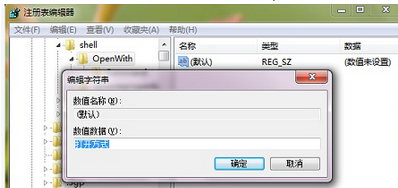
  3. 在 Shell 下新增項目 OpenWith。
  4. 選中 OpenWith,右側「預設」值雙擊 → 數值資料填 開啟方式。
  5. 在 OpenWith 下新增項目 Command。
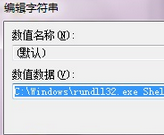
  6. 選中 Command,右側「預設」值填:
    C:\Windows\rundll32.exe Shell32.dll,OpenAs_RunDLL %1
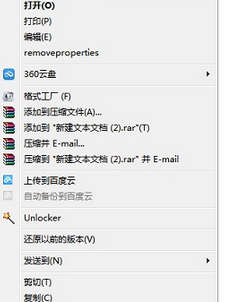
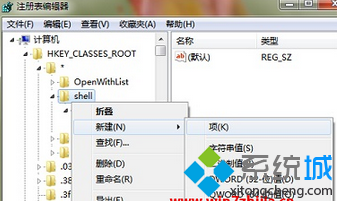
  7. 關閉登錄表 → 重開機/重啟檔案總管,「開啟方式」重現右鍵選單。

替代方案:下載「右鍵修復工具」或「FileTypesMan」(NirSoft) 圖形化修復檔案關聯,避免手改登錄表風險。

Copyright © Windows教程網 All Rights Reserved