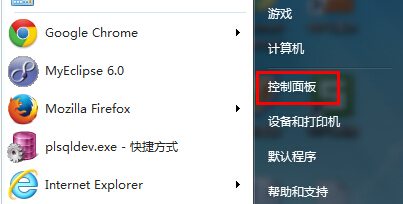
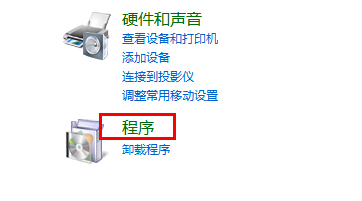
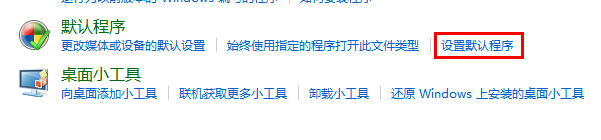
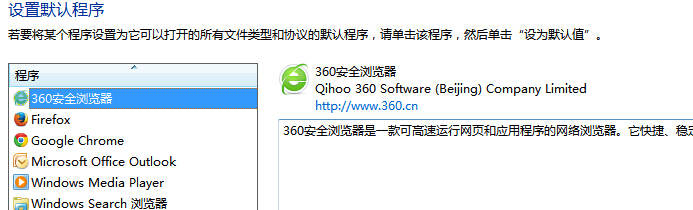
想把 Chrome/Firefox/Edge 設為預設開啟網頁/連結?
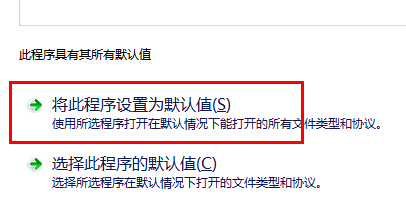
補充:瀏覽器自身設定中通常有「設為預設瀏覽器」按鈕(Chrome:設定→預設瀏覽器→設為預設),點擊後會自動彈出系統「預設程式」視窗,同樣能完成設定。
Win7 寬頻連上卻沒網速?六大原因排查與解決方案
Win7 英文版任務列語言列不見了?圖文教你找回輸入法圖示
Win7 軟體視窗顯示不全?DPI 縮放設定 100% 解決介面截斷
顯存 256MB 共享記憶體能玩什麼遊戲?別期待太高
Win7 寬帶撥號連線不見了怎麼辦?手動建立 PPPoE 連線完整教學
Win7 把螢幕保護程式變成動態桌面牆紙:CMD 一行指令搞定
小城市買電腦,預算多少才夠用?避坑指南來了
Win7 鍵盤打字母變數字怎麼辦?關閉筆電小鍵盤功能即可解決