Windows 7 雙擊執行 .bat 批次檔時,若中文顯示亂碼 (如 、),原因是批次檔以 UTF-8 編碼儲存,但 CMD 預設代碼頁為 936 (GBK/ANSI),無法正確解碼 UTF-8。將檔案編碼轉為 ANSI 即可解決。
解決步驟
- 右鍵 .bat 檔案 → 「編輯」 (用記事本開啟)。
- 點擊「檔案」→「另存新檔」。
- 「編碼」下拉選單選擇 ANSI (非 UTF-8、Unicode、UTF-8 with BOM)。
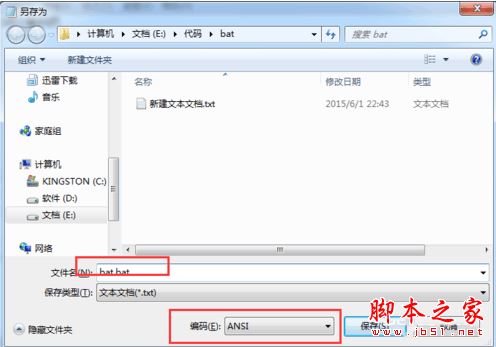
- 「儲存類型」選「所有檔案」→ 檔名保持
xxx.bat → 「儲存」覆蓋原檔。
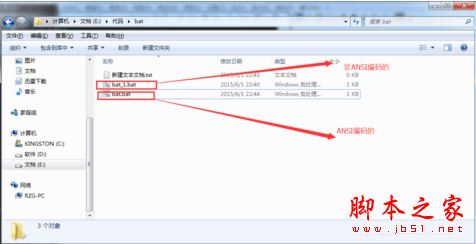
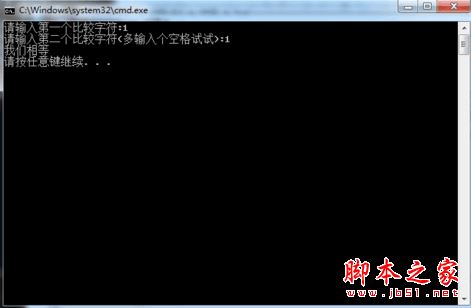
- 重新雙擊執行 .bat,中文應正常顯示。
補充說明
- 若使用 Notepad++、VS Code 等進階編輯器,可在右下角/選單直接切換編碼為「ANSI」/「GBK」/「Chinese Simplified (GB2312)」後存檔。
- 若批次檔需在 UTF-8 環境執行 (如 PowerShell Core、Linux wine),可在檔案開頭加入
chcp 65001 切換代碼頁,但 Win7 CMD 原生不完整支援 UTF-8 顯示中文。
- 此問題同樣適用於 .cmd、.vbs 等腳本檔案。