Win7 桌面建立、刪除、重新命名捷徑後,畫面不自動更新,必須按 F5 才會顯示最新狀態。這通常是登錄檔 UpdateMode 鍵值遺失或錯誤導致。以下提供登錄檔修復步驟。
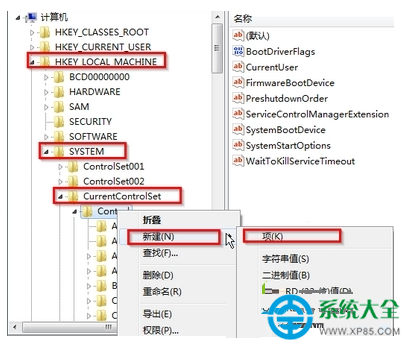
regedit 開啟登錄檔編輯器。HKEY_LOCAL_MACHINE\SYSTEM\CurrentControlSet\Control
Control 上右鍵 → 「新增」→ 「項目」,命名為 Update。Update 項目上右鍵 → 「新增」→ 「字串值」,命名為 UpdateMode。UpdateMode,將數值資料設為 0 → 確定。explorer.exe 生效。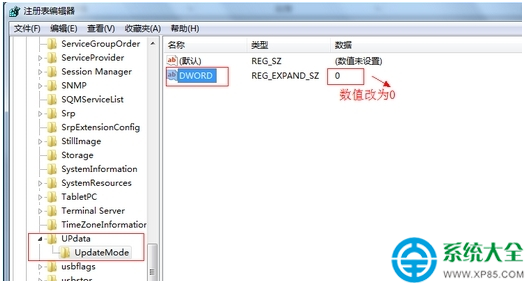
原理說明: UpdateMode = 0 代表啟用非同步更新通知,讓 Shell 即時收到檔案系統變更事件,桌面圖示即可自動重新整理。若修改後仍無效,請檢查是否有第三方殼擴充套件干擾,或嘗試建立新使用者帳號測試。