Windows XP Windows 7 Windows 2003 Windows Vista Windows 綜合教學 Linux 系統教學
Windows 10 Windows 8 Windows 2008 Windows NT Windows Server 電腦軟體教學

Win7 搜尋功能失效怎麼辦?登錄表新增 UseSearchAsst 修復搜尋框

編輯:Win7 系統應用技巧

Windows 7 檔案總管右上角搜尋框無法輸入、搜尋無反應或結果為空,常因登錄表缺少 UseSearchAsst 字串值導致。手動新增並設定即可恢復搜尋功能。

修復步驟

  1. 按 Win + R 輸入 regedit 開啟登錄編輯器。
  2. 依路徑展開:
    HKEY_CURRENT_USER\Software\Microsoft\Windows\CurrentVersion\Explorer\CabinetState
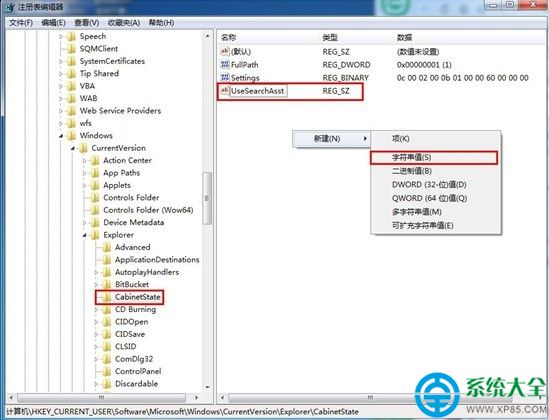
  3. 在右側空白處右鍵 →「新增」→「字串值」,命名為 UseSearchAsst。
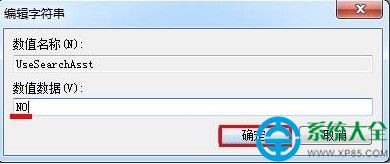
  4. 雙擊 UseSearchAsst,將「數值資料」設為 NO(大寫),點擊確定。
  5. 關閉登錄編輯器,重新啟動 explorer.exe 或重開機,搜尋框即恢復正常。

原理:此值控制是否使用舊版搜尋助手,設為 NO 強制使用 Windows 7 新版搜尋索引服務,修復搜尋失效問題。

Copyright © Windows教程網 All Rights Reserved