Windows 7 內建「寫字板」無法正確渲染 .doc/.docx 文檔,雙擊開啟顯示亂碼,根因是檔案關聯錯誤指向 WordPad 而非 Microsoft Word。本文教您透過「預設程式」將 Office 文檔關聯回 Word。
修復步驟
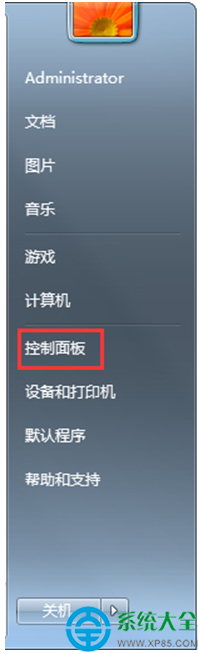
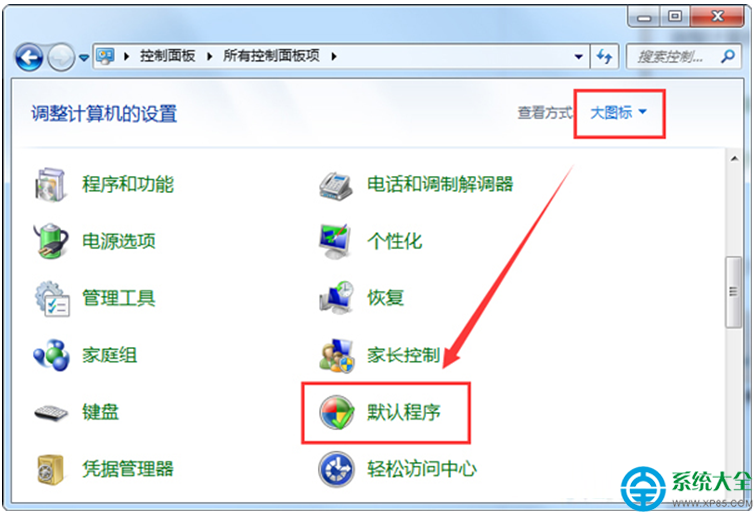
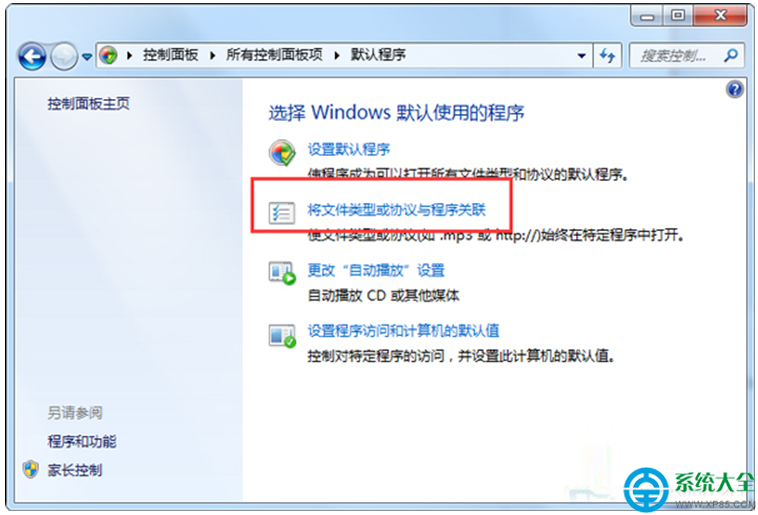
- 開啟「控制台」→ 切換「大圖示」檢視 → 點擊「預設程式」。
- 選擇「將檔案類型或通訊協定與程式建立關聯」。
- 在清單中找到 .doc、.docx、.docm 三個副檔名。
- 逐一選中 → 點擊「變更程式」→ 在推薦程式中選擇 Microsoft Office Word(或 Word 2016/2019/365)→ 確定。
- 完成後雙擊任意 Word 文檔驗證是否正常開啟。
補充說明
- 若清單中找不到 Word,請點擊「瀏覽」手動定位
WINWORD.EXE(通常在 C:\Program Files\Microsoft Office\root\Office16\)。
- 此操作需已安裝 Microsoft Office;若僅安裝 WPS,請選擇
wps.exe。
- 修復後建議重啟電腦確保殼擴展重新載入。