Windows XP Windows 7 Windows 2003 Windows Vista Windows 綜合教學 Linux 系統教學
Windows 10 Windows 8 Windows 2008 Windows NT Windows Server 電腦軟體教學

Win7/8.1 重裝系統後桌面僅剩回收站?一鍵恢復常用圖示

編輯:Win7 系統應用技巧

重裝 Win7 或 Win8.1 系統後,桌面常只剩「回收站」圖示,「電腦」、「網路」、「使用者的檔案」、「控制台」等常用圖示消失。這非系統故障,僅是預設未勾選,透過「桌面圖示設定」即可恢復。

恢復步驟

步驟 1:進入個人化設定

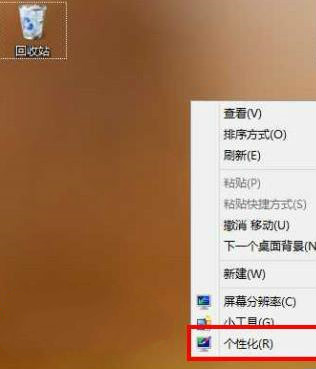
桌面空白處右鍵 → 選擇「個人化」。

桌面右鍵-個人化

步驟 2:開啟桌面圖示設定

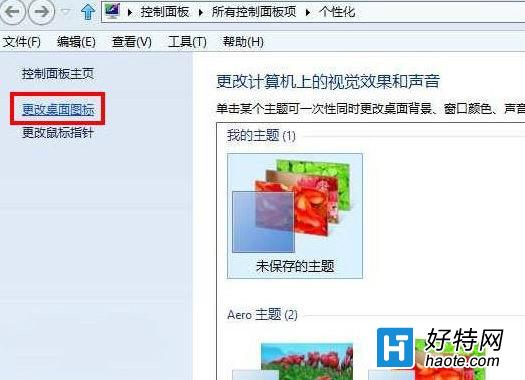
在左側選單點擊「更改桌面圖示」。

更改桌面圖示連結

步驟 3:勾選所需圖示並確定

在「桌面圖示」視窗中,勾選需要顯示的圖示(建議全選:電腦、使用者的檔案、網路、回收站、控制台),點擊「確定」。
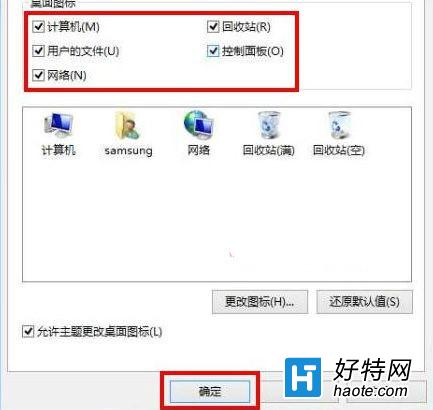
勾選桌面圖示

小提示

此設定屬使用者配置,重裝系統後預設為最小化顯示。若在精簡版系統(Ghost)中仍無法顯示,請檢查 Shell32.dll 是否完整,或嘗試重建圖示快取:刪除 %LocalAppData%\IconCache.db 後重啟。

Copyright © Windows教程網 All Rights Reserved